


AI 智能摘要
不少成功的网站都会通过各种方式来展示其用户群体的增长和活跃,例如实时显示“XX用户刚刚加入了本站”的通知。这种动态展示能够有效营造出网站“人气旺盛”的氛围,增强新访客的信任感和归属感。针对WordPress子比主题的用户,主题铺特别收集并整理了一段代码,可以帮助您轻松实现这一功能,通过一个可配置的小工具来展示最新注册的用户信息。
WordPress网站的活跃度是吸引和留住用户的重要因素之一。不少成功的网站都会通过各种方式来展示其用户群体的增长和活跃,例如实时显示“XX用户刚刚加入了本站”的通知。这种动态展示能够有效营造出网站“人气旺盛”的氛围,增强新访客的信任感和归属感。针对WordPress子比主题的用户,主题铺特别收集并整理了一段代码,可以帮助您轻松实现这一功能,通过一个可配置的小工具来展示最新注册的用户信息。
![图片[1]-WordPress子比主题“最新用户通知”小工具 营造活跃网站氛围-主题铺](https://cdn.zhutipu.com/wp-content/uploads/2025/09/20250924103532414.gif/ztp)
功能介绍:
这段代码将为您的WordPress子比主题网站添加一个名为“ZHUTIPU – 最新用户通知”的自定义小工具。该小工具能够动态滚动显示最新注册的用户信息,包括用户的头像、用户名以及注册时间,从而帮助网站营造出更加活跃和受欢迎的氛围。
核心亮点:
- 动态滚动展示: 利用Swiper库实现用户信息的垂直滚动展示。
- 可配置参数: 在后台小工具设置中,您可以自定义:
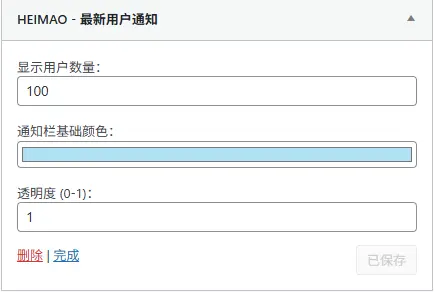
- 显示用户数量: 控制小工具中显示最新注册用户的数量。
- 通知栏基础颜色: 设置通知背景的基准颜色。
- 透明度: 调整通知栏背景的透明度,使其与网站设计更好地融合。
- 集成子比主题特性: 自动获取用户头像和用户主页链接,完美融入子比主题的用户体系。
- 无需复杂设置: 仅需将代码添加到指定文件,即可在小工具区域启用。
安装方法:
将以下PHP代码添加到您的WordPress子比主题的func.php文件或子主题的functions.php文件中。
- 登录WordPress后台。
- 导航到主题文件编辑器: 通常在“外观”(Appearance)>“主题文件编辑器”(Theme File Editor)。
- 选择正确的文件: 在右侧文件列表中,找到并点击您主题的
func.php文件(如果是子比主题)或子主题的functions.php文件。- 主题铺建议: 强烈推荐使用子主题。如果直接修改父主题文件,主题更新时您的更改将会丢失。
- 粘贴代码并保存: 将以下代码复制并粘贴到文件的末尾(在
?>之前,如果文件末尾没有?>则直接粘贴)。 - 刷新PHP进程: 保存文件后,为了确保更改立即生效,您可能需要清除网站缓存(如果使用缓存插件)并刷新WordPress站点的PHP进程(例如,通过重启PHP-FPM服务或刷新网站页面)。
代码如下:
<?php
// 主题铺提醒:如果您的主题已定义了<?php标签,请勿重复添加

// 注册最新用户通知小工具 主题铺www.zhutipu.com
class DearLicy_Notice_Widget extends WP_Widget {
    // 构造函数,定义小工具的名称和描述
    public function __construct() {
        parent::__construct(
            'dearlicy_notice_widget', // 小工具ID
            'ZHUTIPU - 最新用户通知', // 小工具名称,会在后台显示
            array('description' => '显示最新注册的用户信息') // 小工具描述
        );
    }

    // 小工具前端显示内容
    public function widget($args, $instance) {
        global $wpdb; // 全局WPDB对象,用于数据库查询

        // 获取小工具设置中的用户数量,默认为10
        $user_count = !empty($instance['user_count']) ? intval($instance['user_count']) : 10;

        // 获取小工具设置中的基础颜色和透明度,并进行合法性检查
        $base_color = !empty($instance['base_color']) ? $instance['base_color'] : '#ff0000';
        $opacity = isset($instance['opacity']) ? floatval($instance['opacity']) : 0.8;
        $opacity = max(0, min(1, $opacity)); // 确保透明度在0到1之间

        // 将HEX颜色转换为RGB,并结合透明度生成CSS可用的RGBA颜色字符串
        $rgb = $this->hex_to_rgb($base_color);
        $notice_color = $rgb ? "rgba({$rgb['r']}, {$rgb['g']}, {$rgb['b']}, {$opacity})" : "rgba(255, 0, 0, {$opacity})";

        // 查询最新注册的用户
        $sql = $wpdb->prepare(
            "SELECT ID, user_login, user_registered
            FROM $wpdb->users
            ORDER BY user_registered DESC
            LIMIT %d", // 限制查询数量
            $user_count
        );
        $users = $wpdb->get_results($sql); // 执行查询

        $slides = ''; // 用于存储Swiper幻灯片内容的字符串
        if ($users) {
            foreach ($users as $user) {
                $user_name = esc_html($user->user_login); // 用户名进行HTML实体转义
                // 获取子比主题的用户头像和链接
                $avatar    = zib_get_avatar_box($user->ID, 'avatar-img avatar-mini mr6', false, true);
                $link      = esc_url(zib_get_user_home_url($user->ID));
                // 格式化注册时间
                $registration_date = date('Y-m-d H:i:s', strtotime($user->user_registered));

                // 构建单个Swiper幻灯片内容
                $slide = '<div class="swiper-slide notice-slide">';
                $slide .= '<a href="'.$link.'">' . $avatar . $user_name . ' 在 ' . $registration_date . ' 加入了本站</a>';
                $slide .= '</div>';
                $slides .= $slide; // 拼接所有幻灯片
            }
        }

        // 生成自定义CSS样式,用于控制小工具的显示样式和颜色
        $custom_css = '<style>';
        $custom_css .= '.dearlicy-notice-container { margin: 3px 0; padding: 0; }';
        $custom_css .= '.dearlicy-notice-container .swiper-bulletin {
            margin: 0;
            padding: 0;
            min-height: 36px; /* 固定最小高度确保垂直居中效果 */
            display: flex;
            align-items: center; /* 垂直居中 */
            justify-content: center; /* 水平居中 */
        }';
        $custom_css .= '.dearlicy-notice-container .swiper-slide a {
            text-align: center;
            white-space: nowrap; /* 防止文本换行 */
            line-height: 1; /* 重置行高 */
            padding: 8px 0; /* 统一内边距 */
        }';
        $custom_css .= '.dearlicy-notice-container * {
            margin: 0;
            padding: 0;
            box-sizing: border-box;
        }';
        // 应用通知栏背景颜色和透明度
        $custom_css .= '.dearlicy-notice-container .swiper-bulletin {
            background-color: ' . esc_attr($notice_color) . ' !important;
        }';
        $custom_css .= '</style>';

        // 构建小工具的HTML结构
        $html = $custom_css;
        $html .= '<div class="dearlicy-notice-container">';
        $html .= '<div class="swiper-bulletin radius8">'; // radius8是子比主题的圆角class
        $html .= '<div class="new-swiper" data-interval="5000" data-direction="vertical" data-loop="true" data-autoplay="1">'; // Swiper配置
        $html .= '<div class="swiper-wrapper">'.$slides.'</div>'; // 幻灯片容器
        $html .= '<span class="swiper-notification" aria-live="assertive" aria-atomic="true"></span>';
        $html .= '</div></div></div>';

        // 移除小工具默认的zib-widget和自身class,避免样式冲突或重复
        $before_widget = str_replace(
            array('zib-widget', 'widget_dearlicy_notice_widget'),
            '',
            $args['before_widget']
        );
        $before_widget = preg_replace('/\s+/', ' ', $before_widget); // 清理多余空格

        echo $before_widget . $html . $args['after_widget']; // 输出小工具内容
    }

    // HEX颜色转RGB数组的辅助函数
    private function hex_to_rgb($hex) {
        $hex = ltrim($hex, '#');
        if (!preg_match('/^([0-9a-fA-F]{3}){1,2}$/', $hex)) { // 检查HEX颜色格式
            return false;
        }
        if (strlen($hex) == 3) { // 缩写HEX颜色扩展
            $hex = $hex[0].$hex[0].$hex[1].$hex[1].$hex[2].$hex[2];
        }
        return array(
            'r' => hexdec(substr($hex, 0, 2)),
            'g' => hexdec(substr($hex, 2, 2)),
            'b' => hexdec(substr($hex, 4, 2))
        );
    }

    // 小工具后台设置表单
    public function form($instance) {
        // 获取当前设置或默认值
        $user_count = !empty($instance['user_count']) ? $instance['user_count'] : 10;
        $base_color = !empty($instance['base_color']) ? $instance['base_color'] : '#ff0000';
        $opacity = isset($instance['opacity']) ? $instance['opacity'] : 0.8;
        ?>

        <p>
            <label for="<?php echo $this->get_field_id('user_count'); ?>">显示用户数量:</label>
            <input class="widefat" id="<?php echo $this->get_field_id('user_count'); ?>"
                   name="<?php echo $this->get_field_name('user_count'); ?>"
                   type="number" min="1" max="100" value="<?php echo esc_attr($user_count); ?>">
        </p>

        <p>
            <label for="<?php echo $this->get_field_id('base_color'); ?>">通知栏基础颜色:</label>
            <input class="widefat" id="<?php echo $this->get_field_id('base_color'); ?>"
                   name="<?php echo $this->get_field_name('base_color'); ?>"
                   type="color" value="<?php echo esc_attr($base_color); ?>">
        </p>

        <p>
            <label for="<?php echo $this->get_field_id('opacity'); ?>">透明度 (0-1):</label>
            <input class="widefat" id="<?php echo $this->get_field_id('opacity'); ?>"
                   name="<?php echo $this->get_field_name('opacity'); ?>"
                   type="number" step="0.05" min="0" max="1" value="<?php echo esc_attr($opacity); ?>">
        </p>

        <?php
    }

    // 保存小工具设置
    public function update($new_instance, $old_instance) {
        $instance = array();
        // 验证并保存用户数量
        $instance['user_count'] = (!empty($new_instance['user_count'])) ? intval($new_instance['user_count']) : 10;
        // 验证并保存基础颜色
        $instance['base_color'] = (!empty($new_instance['base_color'])) ? sanitize_hex_color($new_instance['base_color']) : '#ff0000';
        // 验证并保存透明度,确保在0到1之间
        $instance['opacity'] = isset($new_instance['opacity']) ? max(0, min(1, floatval($new_instance['opacity']))) : 0.8;
        return $instance;
    }
}

// 注册小工具
function register_dearlicy_notice_widget() {
    register_widget('DearLicy_Notice_Widget');
}
add_action('widgets_init', 'register_dearlicy_notice_widget');
?>
使用方法:
- 添加小工具: 代码添加并保存后,登录WordPress后台。
- 导航到小工具页面: 前往“外观”(Appearance)>“小工具”(Widgets)。
- 拖拽小工具: 在可用小工具列表中,找到“ZHUTIPU – 最新用户通知”,将其拖拽到您想要显示的位置(如侧边栏、页脚等)。
- 配置小工具: 点击小工具的标题展开设置选项,您可以调整“显示用户数量”、“通知栏基础颜色”和“透明度”。
- 保存设置: 配置完成后,点击“保存”按钮。
![图片[2]-WordPress子比主题“最新用户通知”小工具 营造活跃网站氛围-主题铺](https://cdn.zhutipu.com/wp-content/uploads/2025/09/20250924103458362.webp/ztp)
主题铺点评: 这段代码为子比主题提供了一个非常实用且具有良好定制性的小工具。它不仅能够动态展示网站的活跃度,增强用户对网站的信任感和粘性,而且通过集成子比主题的用户体系和可配置的样式选项,完美融入了网站的整体设计。对于希望提升网站互动氛围和用户体验的站长来说,这是一个不容错过的功能。
© 版权声明
THE END








暂无评论内容