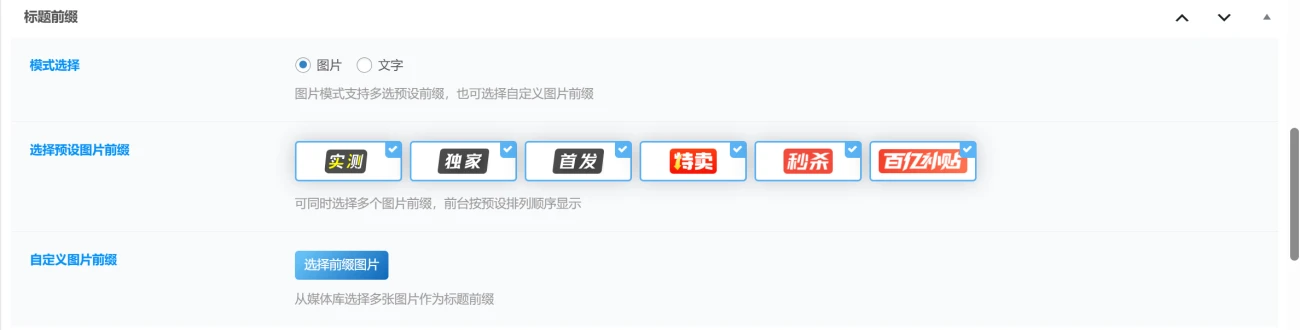



想给WordPress文章标题加点前缀?这事儿说起来简单,但真要弄得好用、美观,还得费点心思。尤其咱们用的是WordPress子比主题,那更得注意兼容性了。网上那些教程,有些老的代码可能直接让主题报错,或者样式丑到没法看。我前两天就为了这事儿折腾到半夜,总算挖到了一个比较靠谱的方案,而且还有代码版和插件版可选,这下大家不用愁了。
这个新方案据说不仅修复了之前一些老版本文章前缀的BUG,还增加了自定义上传图片前缀的功能。这可是个好消息,毕竟有时候我们想用一些特别的图标或者自己的Logo做前缀,纯文字或者主题内置的几个图标肯定不够用。
代码版玩法
先说说代码版,这个比较适合有点折腾精神的站长。
![图片[1]-WordPress子比主题美化-文章标题前缀插件及代码分享-主题铺](https://cdn.zhutipu.com/wp-content/uploads/2026/05/20260503161915441.png/ztp)
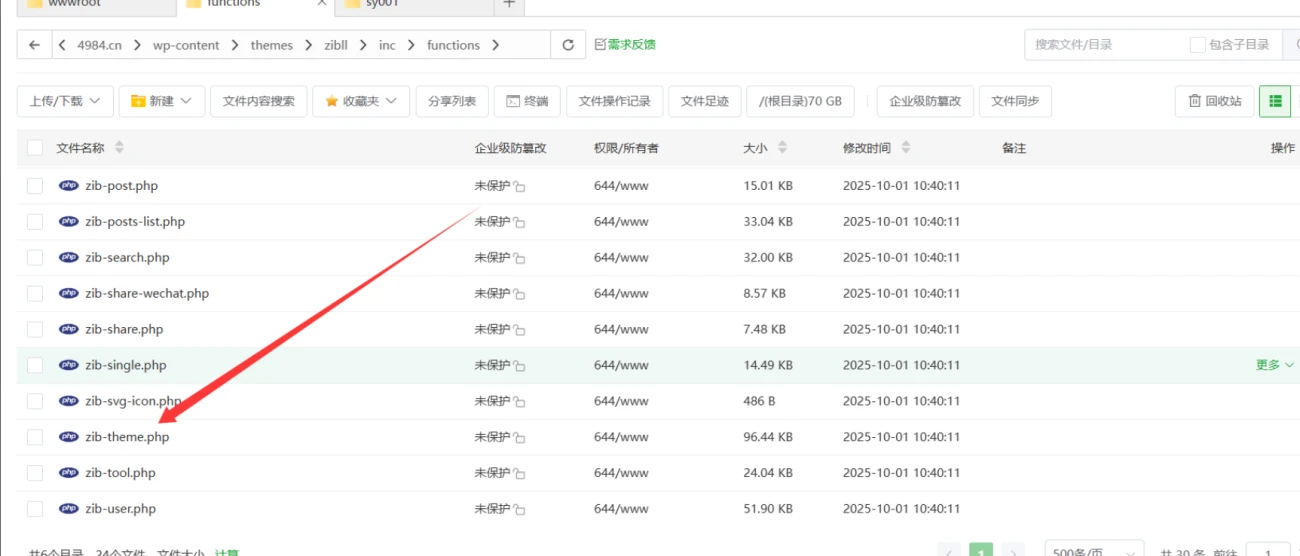
你得把提供的PHP代码加到主题的根目录里。一般是func.php文件,如果你的主题里没有这个文件,那加到functions.php里也行。不过动手前切记备份主题,不然搞出白屏了可别怪我没提醒。
核心代码逻辑大概是这样的:
它先定义了一个dearlicy_prefix_images()函数,这里面预设了一些图片前缀和对应的URL。比如“shice”(实测)、“dujia”(独家)之类的,每种都配了一个webp格式的图片链接。
//MS应用-https://code.luvms.top
if (!defined('ABSPATH')) {
    exit;
}

function dearlicy_prefix_images()
{
    return array(
        'shice'       => 'https://free.boltp.com/2026/05/02/69f5fe72696d4.webp',
        'dujia'       => 'https://free.boltp.com/2026/05/02/69f5fe7207395.webp',
        'shoufa'      => 'https://free.boltp.com/2026/05/02/69f5fe71e6136.webp',
        'temai'       => 'https://free.boltp.com/2026/05/02/69f5fd9865b63.webp',
        'miaosha'     => 'https://free.boltp.com/2026/05/02/69f5fd994a40e.webp',
        'baiyibutie'  => 'https://free.boltp.com/2026/05/02/69f5fd9a0af79.webp',
    );
}

if (!class_exists('DearLicy_Module')) {
    class DearLicy_Module
    {
        public static function DearLicy_imgtitle($images = array())
        {
            return array_merge($images, dearlicy_prefix_images());
        }
    }
}

if (class_exists('CSF')) {
    CSF::createMetabox('DearLicy_titles', array(
        'title'     => '标题前缀',
        'post_type' => 'post',
        'context'   => 'advanced',
        'data_type' => 'unserialize',
        'priority'  => 'high',
    ));

    CSF::createSection('DearLicy_titles', array(
        'fields' => array(
            array(
                'id'      => 'titles_moshi',
                'type'    => 'radio',
                'title'   => '模式选择',
                'desc'    => '图片模式支持多选预设前缀,也可选择自定义图片前缀',
                'inline'  => true,
                'options' => array(
                    'img'  => '图片',
                    'text' => '文字',
                ),
                'default' => 'img',
            ),
            array(
                'id'         => 'text',
                'type'       => 'text',
                'title'      => '文字模式',
                'desc'       => '建议两个字',
                'dependency' => array('titles_moshi', '==', 'text'),
            ),
            array(
                'id'         => 'text_bg_color',
                'type'       => 'palette',
                'title'      => '背景颜色',
                'desc'       => '部分颜色带有文字颜色,其余默认白色',
                'class'      => 'compact skin-color',
                'default'    => 'jb-vip2',
                'options'    => class_exists('CFS_Module') ? CFS_Module::zib_palette(array(), array('jb')) : array(),
                'dependency' => array('titles_moshi', '==', 'text'),
            ),
            array(
                'id'         => 'img',
                'type'       => 'image_select',
                'title'      => '选择预设图片前缀',
                'desc'       => '可同时选择多个图片前缀,前台按预设排列顺序显示',
                'multiple'   => true,
                'options'    => dearlicy_prefix_images(),
                'dependency' => array('titles_moshi', '==', 'img'),
            ),
            array(
                'id'          => 'custom_img_prefixes',
                'type'        => 'gallery',
                'title'       => '自定义图片前缀',
                'desc'        => '从媒体库选择多张图片作为标题前缀',
                'add_title'   => '选择前缀图片',
                'edit_title'  => '编辑前缀图片',
                'clear_title' => '清空前缀图片',
                'dependency'  => array('titles_moshi', '==', 'img'),
            ),
        ),
    ));
}

function dearlicy_get_selected_prefix_keys($value)
{
    if (empty($value)) {
        return array();
    }

    $keys = is_array($value) ? $value : array($value);
    $keys = array_map('sanitize_key', $keys);

    return array_values(array_intersect(array_keys(dearlicy_prefix_images()), $keys));
}

function dearlicy_get_custom_prefix_urls($value)
{
    if (empty($value)) {
        return array();
    }

    $urls = array();
    foreach ((is_array($value) ? $value : explode(',', $value)) as $item) {
        $attachment_id = is_array($item) ? absint($item['id'] ?? 0) : absint($item);
        $url = $attachment_id ? wp_get_attachment_image_url($attachment_id, 'full') : '';

        if (!$url && is_array($item) && !empty($item['url'])) {
            $url = $item['url'];
        }

        if (!$url && is_string($item) && filter_var($item, FILTER_VALIDATE_URL)) {
            $url = $item;
        }

        if ($url) {
            $urls[] = esc_url_raw($url);
        }
    }

    return array_values(array_filter(array_unique($urls)));
}

function dearlicy_prefix_img($url, $alt = 'prefix')
{
    return $url ? '<img class="DearLicy_prefix_img" src="' . esc_url($url) . '" alt="' . esc_attr($alt) . '" style="height:20px;pointer-events:none;margin-right:3px;vertical-align:-3px;"/>' : '';
}

function dearlicy_title_prefix_html($post_id)
{
    if (get_post_meta($post_id, 'titles_moshi', true) === 'text') {
        $text = get_post_meta($post_id, 'text', true);
        $color = get_post_meta($post_id, 'text_bg_color', true);
        return $text === '' ? '' : '<span class="DearLicy_prefix ' . esc_attr($color) . '">' . esc_html($text) . '</span> ';
    }

    $html = '';
    $images = dearlicy_prefix_images();
    $selected = dearlicy_get_selected_prefix_keys(get_post_meta($post_id, 'img', true));

    foreach ($selected as $key) {
        $html .= dearlicy_prefix_img($images[$key], $key);
    }

    foreach (dearlicy_get_custom_prefix_urls(get_post_meta($post_id, 'custom_img_prefixes', true)) as $index => $url) {
        $html .= dearlicy_prefix_img($url, 'custom-prefix-' . ($index + 1));
    }

    return $html;
}

function dearlicy_is_main_posts_list_title($post_id)
{
    global $wp_query;

    if (!$wp_query instanceof WP_Query || !$wp_query->in_the_loop || empty($wp_query->post->ID)) {
        return false;
    }

    if ((int) $wp_query->post->ID !== (int) $post_id) {
        return false;
    }

    foreach (debug_backtrace(DEBUG_BACKTRACE_IGNORE_ARGS, 8) as $trace) {
        if (!empty($trace['function']) && $trace['function'] === 'zib_get_posts_list_title') {
            return true;
        }
    }

    return false;
}

function dearlicy_should_apply_title_prefix($post_id)
{
    if (!$post_id || is_admin() || is_singular() || is_feed() || get_post_type($post_id) !== 'post') {
        return false;
    }

    return dearlicy_is_main_posts_list_title($post_id);
}

function apply_dearlicy_prefixes_to_title($title, $id = null)
{
    if (!dearlicy_should_apply_title_prefix($id)) {
        return $title;
    }

    $prefix = dearlicy_title_prefix_html($id);

    return $prefix ? $prefix . $title : $title;
}
add_filter('the_title', 'apply_dearlicy_prefixes_to_title', 10, 2);

function dearlicy_title_prefix_admin_style()
{
    $screen = function_exists('get_current_screen') ? get_current_screen() : null;
    if (!$screen || $screen->post_type !== 'post') {
        return;
    }
    ?>
    <style>
        #DearLicy_titles .csf-field-image_select .csf--image {
            margin: 0 8px 8px 0;
            vertical-align: top;
        }

        #DearLicy_titles .csf-field-image_select figure {
            width: 112px;
            height: 42px;
            display: inline-flex;
            align-items: center;
            justify-content: center;
            padding: 6px 8px;
            box-sizing: border-box;
            border-radius: 4px;
        }

        #DearLicy_titles .csf-field-image_select img {
            width: auto;
            height: auto;
            max-width: 100%;
            max-height: 100%;
            display: block;
        }
    </style>
    <?php
}
add_action('admin_head-post.php', 'dearlicy_title_prefix_admin_style');
add_action('admin_head-post-new.php', 'dearlicy_title_prefix_admin_style');接着,它会检查是否使用了CSF(Codestar Framework,一个WordPress选项框架),如果用了,就会创建一个名为DearLicy_titles的Metabox(就是你在WordPress文章编辑页面看到的一个小框),让你来设置文章标题前缀。
这个Metabox里包含了两种模式选择:图片模式和文字模式。
- 文字模式: 你可以直接输入文字作为前缀,比如“推荐”、“教程”什么的。还支持选择背景颜色,有些颜色带文字颜色,其余默认白色。我感觉两个字是最好看的,再长了就有点占地方了。
- 图片模式: 这个就灵活多了。你可以从预设的图片前缀里选择,支持多选,选了几个前台就按你选的顺序显示。最给力的是,它还支持自定义图片前缀,直接从媒体库上传多张图片,想用什么就用什么,这下再也不用担心前缀不够个性化了。
代码里面还有一些辅助函数,比如dearlicy_get_selected_prefix_keys用来获取你选择的预设图片键,dearlicy_get_custom_prefix_urls用来处理自定义图片的URL。dearlicy_prefix_img这个函数是把图片URL转换成<img>标签,并且设置了固定高度和一些CSS样式,保证显示效果。
最关键的,是apply_dearlicy_prefixes_to_title这个过滤器(Filter)。它会挂载到the_title这个WordPress自带的过滤器上,在文章标题显示的时候,把我们设置的前缀加到标题前面。不过它很聪明,通过dearlicy_should_apply_title_prefix和dearlicy_is_main_posts_list_title这两个函数做了判断,确保只有在文章列表页的主文章标题才会添加前缀,不会在后台或者文章详情页乱加。
最后还有一些CSS代码,是用来美化文字模式下前缀的样式,给它加个圆角、阴影、甚至还有个扫光动画,看着确实挺酷炫的。图片模式的样式也做了微调,让图片在Metabox里显示得更整齐。
.DearLicy_prefix{
    position: relative;
    overflow: hidden;
    display: inline-flex;
    align-items: center;
    border-radius: 5px;
    padding: 5px 4px;
    margin-right: 3px;
    height: 19px;
    font-size: 12px;
    top: -3px;
    clip-path: polygon(7% 0, 99% 0, 93% 100%, 0 100%);
}
.DearLicy_prefix:after, .DearLicy_prefix:after {
    position: absolute;
    content: " ";
    display: block;
    left: -100%;
    top: -5px;
    width: 15px;
    height: 145%;
    background-image: linear-gradient(90deg, rgba(255, 255, 255, 0), rgba(255, 255, 255, 0.5), rgba(255, 255, 255, 0));
    animation: sweepTitle 3s ease-in-out infinite;
    transform: rotate(28deg);
}
@keyframes sweepTitle {
    0% {
        left: -100%
    }

    100% {
        left: 100%
    }
}
插件版
至于插件版,就是把上面这些PHP代码和CSS打包成一个WordPress插件。对于不想直接修改主题文件、或者对代码不太熟悉的站长来说,插件版肯定更友好。直接上传、启用,然后在文章编辑页面就能看到那个设置前缀的Metabox了。功能跟代码版差不多,同样支持文字和图片前缀,特别是自定义图片前缀这个点,插件版用起来应该会更顺手。
![图片[2]-WordPress子比主题美化-文章标题前缀插件及代码分享-主题铺](https://cdn.zhutipu.com/wp-content/uploads/2026/05/20260503162053232.png/ztp)
下载地址在最下方
总的来说,这个方案把WordPress子比主题的文章标题前缀功能搞得更完善了,特别是自定义图片前缀这个,给站长们提供了更多个性化选择。如果你也是WordPress子比主题的用户,又想让自己的文章标题更吸睛一点,无论是选择代码版还是期待插件版,这都是个值得折腾一下的功能。









暂无评论内容