


AI 智能摘要
忘记了管理员密码,点击“找回密码”却因为服务器没配置邮件服务而收不到重置邮件。按照传统的做法,你可能需要登录phpMyAdmin去数据库里修改wp_users表,或者去 FTP 里修改主题的 functions.php。对于不熟悉数据库操作的新手来说,这既麻烦又有把网站改崩的风险。今天,主题铺为大家分享一个简单粗暴且安全的紧急救援方案。你只需要上传一个 PHP 文件,即可一键重置任意管理员的密码。
做 WordPress 站长最抓狂的时刻莫过于:忘记了管理员密码,点击“找回密码”却因为服务器没配置邮件服务而收不到重置邮件。
按照传统的做法,你可能需要登录phpMyAdmin去数据库里修改wp_users表,或者去 FTP 里修改主题的 functions.php。对于不熟悉数据库操作的新手来说,这既麻烦又有把网站改崩的风险。今天,主题铺为大家分享一个简单粗暴且安全的紧急救援方案。你只需要上传一个 PHP 文件,即可一键重置任意管理员的密码。
方案优势
- 零数据库操作:无需进入 phpMyAdmin,不碰数据库,风险极低。
- 安全防护:脚本执行成功后自动自毁(自动删除文件),防止留下后门。
- 多管理员支持:如果你的网站有多个管理员账号,它可以自动列出所有管理员供你选择。
- 一键生成强密码:内置强密码生成器,并支持一键复制,方便快捷。
- 二次确认:防止误操作,修改前会有弹窗确认。
效果预览
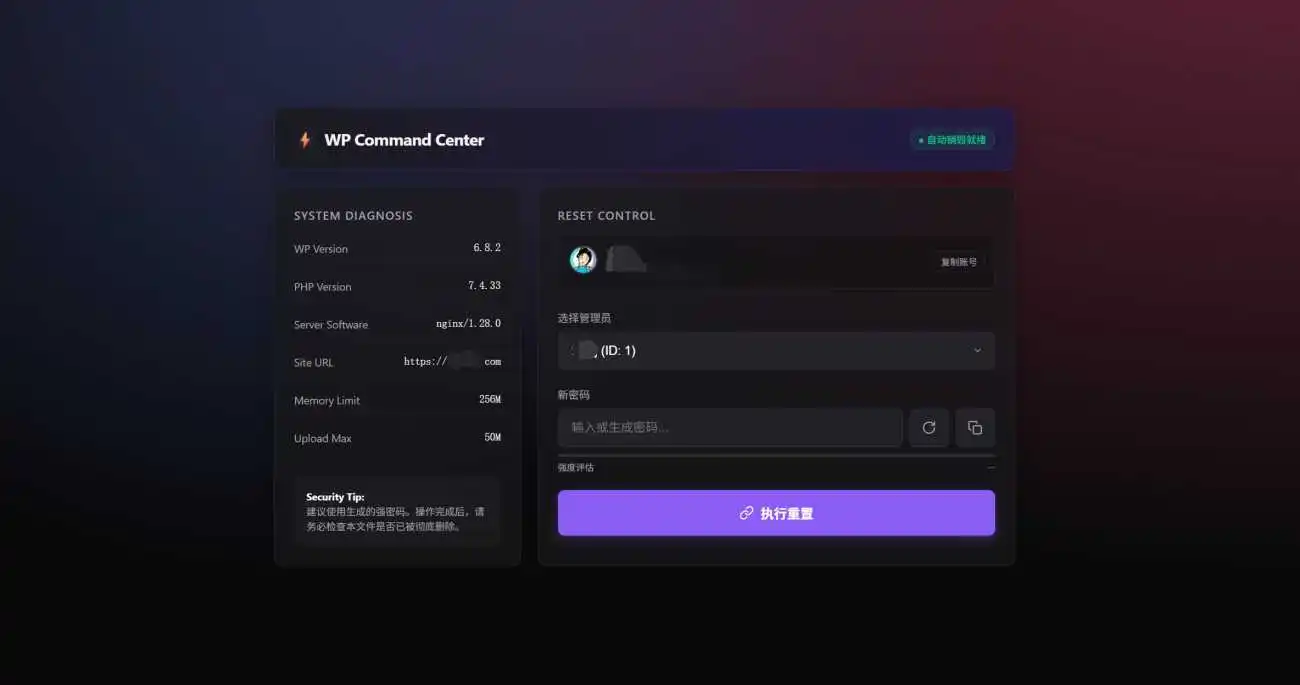
这款工具拥有现代化的极光深色 UI 设计,不仅功能强大,界面也非常极客。
![图片[1]-WordPress忘记密码且收不到邮件?一个PHP文件实现“暴力”重置(免数据库操作)-主题铺](https://cdn.zhutipu.com/wp-content/uploads/2026/01/20260123165154951.png/ztp)
![图片[2]-WordPress忘记密码且收不到邮件?一个PHP文件实现“暴力”重置(免数据库操作)-主题铺](https://cdn.zhutipu.com/wp-content/uploads/2026/01/20260123165201317.png/ztp)
![图片[3]-WordPress忘记密码且收不到邮件?一个PHP文件实现“暴力”重置(免数据库操作)-主题铺](https://cdn.zhutipu.com/wp-content/uploads/2026/01/20260123165207962.png/ztp)
详细使用教程
第一步:创建救援文件
- 在你的电脑上新建一个文本文件,重命名为
reset.php(或者任意你喜欢的名字,如help.php)。 - 将下方的完整代码复制并粘贴进去。
⚠️ 重要安全提示:
请务必修改代码第 11 行的 define('ACCESS_KEY', 'shiguang');。
将 'shiguang' 修改为你自己设定的一个复杂密钥(例如 'mypwd123')。这是为了防止别人猜到文件名后恶意重置你的密码。
核心代码
<?php
/**
 * WordPress 紧急救援控制台 (主题铺定制版)
 * 功能:免数据库重置管理员密码
 */
// ==================== [ 配置区域 ] ====================
define('ACCESS_KEY', 'shiguang'); // ⚠️ 请务必修改此处的密钥!
// =====================================================

// [安全层 0] HTTP 安全头加固
header('X-Frame-Options: DENY');
header('X-Content-Type-Options: nosniff');
header('X-Robots-Tag: noindex, nofollow');
// [安全层 1] 密钥验证
if (!isset($_GET['key']) || !hash_equals(ACCESS_KEY, $_GET['key'])) {
    http_response_code(403);
    die('<!DOCTYPE html><html style="background:#09090b;height:100%;display:grid;place-items:center;color:#ef4444;font-family:sans-serif;"><body><div style="text-align:center"><h1>ACCESS DENIED</h1><p>Invalid Key</p></div></body></html>');
}
// [安全层 2] 环境加载
if (!file_exists('wp-load.php')) {
    die('<div style="background:#111;color:#f87171;padding:20px;text-align:center;font-family:sans-serif;">❌ 错误:未找到 wp-load.php,请将此文件上传至 WordPress 根目录。</div>');
}
// 屏蔽非致命报错
error_reporting(E_ERROR | E_PARSE);
require_once('wp-load.php');
// 辅助函数:使用 Cravatar 替代 Gravatar
function get_cravatar_url($email, $size = 64) {
    $hash = md5(strtolower(trim($email)));
    return "https://cravatar.cn/avatar/{$hash}?s={$size}&d=mp";
}
// 核心逻辑处理
$status_msg = '';
$status_type = '';
if ($_SERVER['REQUEST_METHOD'] === 'POST' && isset($_POST['action']) && $_POST['action'] === 'reset_confirmed') {
    $user_id = intval($_POST['user_id']);
    $password = trim($_POST['password']);

    if ($user_id && $password) {
        $user = get_user_by('id', $user_id);
        if ($user && in_array('administrator', $user->roles)) {
            wp_set_password($password, $user_id);
            $status_msg = "管理员 [{$user->user_login}] 密码重置成功!脚本正在自毁...";
            $status_type = 'success';

            // 延迟自毁
            register_shutdown_function(function() {
                global $status_type;
                if ($status_type === 'success' && file_exists(__FILE__)) {
                    @unlink(__FILE__);
                }
            });
        } else {
            $status_msg = "错误:用户不存在或非管理员。";
            $status_type = 'error';
        }
    } else {
        $status_msg = "错误:请填写完整信息。";
        $status_type = 'error';
    }
}
// 获取数据
$admins = get_users(['role__in' => ['administrator'], 'fields' => ['ID', 'user_login', 'user_email', 'display_name']]);
$sys_info = [
    'WP Version' => get_bloginfo('version'),
    'PHP Version' => phpversion(),
    'Server Software' => $_SERVER['SERVER_SOFTWARE'],
    'Site URL' => get_site_url(),
    'Memory Limit' => ini_get('memory_limit'),
    'Upload Max' => ini_get('upload_max_filesize'),
];
$can_write = is_writable(__FILE__);
?>
<!DOCTYPE html>
<html lang="zh-CN">
<head>
    <meta charset="UTF-8">
    <meta name="viewport" content="width=device-width, initial-scale=1.0">
    <title>WP Command Center</title>
    <style>
        :root { --bg-body: #09090b; --bg-card: rgba(24, 24, 27, 0.7); --bg-input: rgba(39, 39, 42, 0.8); --border: rgba(63, 63, 70, 0.5); --text-main: #f4f4f5; --text-muted: #a1a1aa; --accent: #8b5cf6; --accent-hover: #7c3aed; --danger: #ef4444; --warning: #f59e0b; --success: #10b981; --radius: 12px; --glass: blur(12px); }
        * { box-sizing: border-box; margin: 0; padding: 0; outline: none; }
        body { font-family: -apple-system, BlinkMacSystemFont, "Segoe UI", Roboto, Helvetica, Arial, sans-serif; background-color: var(--bg-body); color: var(--text-main); min-height: 100vh; display: flex; align-items: center; justify-content: center; overflow-x: hidden; background-image: radial-gradient(at 0% 0%, hsla(253,16%,7%,1) 0, transparent 50%), radial-gradient(at 50% 0%, hsla(225,39%,30%,1) 0, transparent 50%), radial-gradient(at 100% 0%, hsla(339,49%,30%,1) 0, transparent 50%); background-size: 150% 150%; animation: bgAnim 15s ease infinite; }
        @keyframes bgAnim { 0% { background-position: 0% 50%; } 50% { background-position: 100% 50%; } 100% { background-position: 0% 50%; } }
        .dashboard { width: 100%; max-width: 900px; margin: 20px; display: grid; grid-template-columns: 300px 1fr; gap: 20px; position: relative; z-index: 10; }
        @media (max-width: 800px) { .dashboard { grid-template-columns: 1fr; } }
        .card { background: var(--bg-card); backdrop-filter: var(--glass); -webkit-backdrop-filter: var(--glass); border: 1px solid var(--border); border-radius: var(--radius); padding: 24px; box-shadow: 0 8px 32px rgba(0,0,0,0.3); }
        .header-card { grid-column: 1 / -1; display: flex; justify-content: space-between; align-items: center; border-bottom: 1px solid rgba(139, 92, 246, 0.3); background: linear-gradient(to right, rgba(24,24,27,0.8), rgba(30,27,75,0.8)); }
        h1 { font-size: 20px; font-weight: 700; display: flex; align-items: center; gap: 10px; }
        h1 span { color: var(--accent); text-shadow: 0 0 10px rgba(139, 92, 246, 0.5); }
        h2 { font-size: 14px; text-transform: uppercase; color: var(--text-muted); margin-bottom: 15px; letter-spacing: 1px; font-weight: 600; }
        .info-grid { display: grid; gap: 12px; }
        .info-item { display: flex; justify-content: space-between; font-size: 13px; padding: 8px 0; border-bottom: 1px solid rgba(255,255,255,0.05); }
        .info-item span:first-child { color: var(--text-muted); }
        .info-item span:last-child { color: var(--text-main); font-family: monospace; }
        .badge { padding: 4px 10px; border-radius: 20px; font-size: 12px; font-weight: 600; }
        .badge.secure { background: rgba(16, 185, 129, 0.1); color: var(--success); border: 1px solid rgba(16, 185, 129, 0.2); }
        .badge.warning { background: rgba(239, 68, 68, 0.1); color: var(--danger); border: 1px solid rgba(239, 68, 68, 0.2); }
        .admin-list { margin-bottom: 25px; max-height: 220px; overflow-y: auto; border: 1px solid var(--border); border-radius: 8px; background: rgba(0,0,0,0.2); }
        .admin-item { display: flex; align-items: center; padding: 12px; border-bottom: 1px solid var(--border); transition: background 0.2s; }
        .admin-item:last-child { border-bottom: none; }
        .admin-item:hover { background: rgba(255,255,255,0.05); }
        .admin-avatar img { width: 36px; height: 36px; border-radius: 50%; border: 2px solid var(--border); margin-right: 12px; }
        .admin-details { flex: 1; }
        .admin-login { font-weight: 600; color: #fff; font-size: 14px; }
        .admin-email { color: var(--text-muted); font-size: 12px; }
        .copy-btn-sm { background: transparent; border: 1px solid var(--border); color: var(--text-muted); padding: 4px 8px; border-radius: 4px; font-size: 11px; cursor: pointer; }
        .copy-btn-sm:hover { color: #fff; border-color: #fff; }
        .form-group { margin-bottom: 20px; position: relative; }
        label { display: block; font-size: 13px; color: var(--text-muted); margin-bottom: 8px; }
        .input-wrapper { position: relative; display: flex; gap: 8px; }
        select, input { width: 100%; background: var(--bg-input); border: 1px solid var(--border); color: #fff; padding: 14px 16px; border-radius: 8px; font-size: 15px; transition: all 0.2s; appearance: none; }
        select { cursor: pointer; padding-right: 40px; }
        .select-arrow { position: absolute; right: 15px; top: 50%; transform: translateY(-50%); pointer-events: none; color: var(--text-muted); }
        input:focus, select:focus { border-color: var(--accent); box-shadow: 0 0 0 2px rgba(139, 92, 246, 0.2); background: rgba(45, 45, 50, 0.9); }
        .tool-btn { background: var(--bg-input); border: 1px solid var(--border); color: var(--text-muted); width: 48px; display: flex; align-items: center; justify-content: center; border-radius: 8px; cursor: pointer; transition: all 0.2s; flex-shrink: 0; }
        .tool-btn:hover { background: var(--accent); color: white; border-color: var(--accent); }
        .strength-meter { margin-top: 8px; height: 4px; background: rgba(255,255,255,0.1); border-radius: 2px; overflow: hidden; position: relative; }
        .strength-bar { height: 100%; width: 0%; transition: width 0.3s, background-color 0.3s; }
        .strength-text { font-size: 11px; color: var(--text-muted); margin-top: 4px; display: flex; justify-content: space-between; }
        .btn-primary { width: 100%; background: var(--accent); color: white; padding: 16px; border: none; border-radius: 8px; font-size: 16px; font-weight: 600; cursor: pointer; transition: all 0.2s; display: flex; align-items: center; justify-content: center; gap: 8px; box-shadow: 0 4px 12px rgba(139, 92, 246, 0.3); }
        .btn-primary:hover { background: var(--accent-hover); transform: translateY(-1px); box-shadow: 0 6px 16px rgba(139, 92, 246, 0.4); }
        .modal-overlay { position: fixed; top: 0; left: 0; width: 100%; height: 100%; background: rgba(0,0,0,0.85); backdrop-filter: blur(8px); z-index: 100; display: none; place-items: center; opacity: 0; transition: opacity 0.3s; }
        .modal-overlay.active { display: grid; opacity: 1; }
        .modal { background: #18181b; border: 1px solid var(--border); padding: 30px; border-radius: 16px; width: 90%; max-width: 400px; text-align: center; transform: scale(0.9); transition: transform 0.3s; box-shadow: 0 20px 50px rgba(0,0,0,0.5); }
        .modal-overlay.active .modal { transform: scale(1); }
        .modal-icon { width: 60px; height: 60px; border-radius: 50%; display: grid; place-items: center; margin: 0 auto 20px; font-size: 30px; }
        .modal-icon.danger { background: rgba(239, 68, 68, 0.1); color: var(--danger); }
        .modal-icon.success-icon { background: rgba(16, 185, 129, 0.1); color: var(--success); }
        .modal-buttons { display: grid; grid-template-columns: 1fr 1fr; gap: 15px; margin-top: 25px; }
        .btn-cancel { background: transparent; border: 1px solid var(--border); color: #fff; padding: 12px; border-radius: 8px; cursor: pointer; }
        .btn-confirm { background: var(--danger); border: none; color: #fff; padding: 12px; border-radius: 8px; cursor: pointer; font-weight: bold; }
        .btn-confirm:hover { background: #dc2626; }
        .copy-preview { background: rgba(0,0,0,0.3); border: 1px solid var(--border); padding: 12px; border-radius: 8px; font-family: 'Monaco', 'Consolas', monospace; color: var(--accent); margin: 15px 0; word-break: break-all; font-size: 14px; }
        .alert { padding: 15px; border-radius: 8px; margin-bottom: 20px; text-align: center; border: 1px solid transparent; }
        .alert.success { background: rgba(16, 185, 129, 0.1); border-color: rgba(16, 185, 129, 0.3); color: var(--success); }
        .alert.error { background: rgba(239, 68, 68, 0.1); border-color: rgba(239, 68, 68, 0.3); color: var(--danger); }
    </style>
</head>
<body>
<?php if ($status_msg && $status_type == 'success'): ?>
    <div style="text-align:center; padding: 40px; position:relative; z-index:20;">
        <div style="font-size: 60px; margin-bottom: 20px;">✅</div>
        <h2 style="color: #fff; margin-bottom: 10px;">操作成功</h2>
        <p style="color: #a1a1aa; max-width: 400px; margin: 0 auto 30px; line-height: 1.6;">管理员密码已重置。<br>脚本已启动自毁程序。</p>
        <a href="wp-login.php" class="btn-primary" style="text-decoration: none; width: 200px; margin: 0 auto;">前往登录</a>
    </div>
<?php else: ?>
<div class="dashboard">
    <div class="card header-card">
        <h1><span>⚡</span> WP Command Center</h1>
        <div class="badge <?php echo $can_write ? 'secure' : 'warning'; ?>"><?php echo $can_write ? '● 自动销毁就绪' : '● 无写权限 (需手动删除)'; ?></div>
    </div>
    <div class="card">
        <h2>System Diagnosis</h2>
        <div class="info-grid">
            <?php foreach ($sys_info as $label => $val): ?><div class="info-item"><span><?php echo esc_html($label); ?></span><span title="<?php echo esc_attr($val); ?>"><?php echo strlen($val) > 22 ? substr($val, 0, 19).'...' : esc_html($val); ?></span></div><?php endforeach; ?>
        </div>
        <div style="margin-top: 30px; padding: 15px; background: rgba(255,255,255,0.03); border-radius: 8px; font-size: 12px; color: var(--text-muted); line-height: 1.5;"><strong style="color: #fff;">Security Tip:</strong><br>建议使用生成的强密码。操作完成后,请务必检查本文件是否已被彻底删除。</div>
    </div>
    <div class="card">
        <h2>Reset Control</h2>
        <?php if ($status_msg): ?><div class="alert <?php echo $status_type; ?>"><?php echo esc_html($status_msg); ?></div><?php endif; ?>
        <div class="admin-list">
            <?php foreach ($admins as $admin): ?>
            <div class="admin-item">
                <div class="admin-avatar"><img src="<?php echo get_cravatar_url($admin->user_email); ?>" alt="avatar"></div>
                <div class="admin-details"><div class="admin-login"><?php echo esc_html($admin->user_login); ?></div><div class="admin-email"><?php echo esc_html($admin->user_email); ?></div></div>
                <button class="copy-btn-sm" type="button" onclick="copyText('<?php echo esc_js($admin->user_login); ?>', '账号')">复制账号</button>
            </div>
            <?php endforeach; ?>
        </div>
        <form id="resetForm" method="POST">
            <input type="hidden" name="action" value="reset_confirmed">
            <div class="form-group"><label>选择管理员</label><div class="input-wrapper"><select name="user_id" id="userSelect" required><?php foreach ($admins as $admin): ?><option value="<?php echo $admin->ID; ?>"><?php echo esc_html($admin->user_login); ?> (ID: <?php echo $admin->ID; ?>)</option><?php endforeach; ?></select><svg class="select-arrow" width="12" height="12" viewBox="0 0 24 24" fill="none" stroke="currentColor" stroke-width="2" stroke-linecap="round" stroke-linejoin="round"><path d="M6 9l6 6 6-6"/></svg></div></div>
            <div class="form-group"><label>新密码</label><div class="input-wrapper"><input type="text" name="password" id="newPass" placeholder="输入或生成密码..." autocomplete="off" required oninput="checkStrength(this.value)"><button type="button" class="tool-btn" onclick="generatePass()" title="生成强密码"><svg width="18" height="18" viewBox="0 0 24 24" fill="none" stroke="currentColor" stroke-width="2" stroke-linecap="round" stroke-linejoin="round"><path d="M21 12a9 9 0 1 1-9-9c2.52 0 4.93 1 6.74 2.74L21 8"></path><path d="M21 3v5h-5"></path></svg></button><button type="button" class="tool-btn" onclick="copyPass()" title="复制密码"><svg width="18" height="18" viewBox="0 0 24 24" fill="none" stroke="currentColor" stroke-width="2" stroke-linecap="round" stroke-linejoin="round"><rect x="9" y="9" width="13" height="13" rx="2" ry="2"></rect><path d="M5 15H4a2 2 0 0 1-2-2V4a2 2 0 0 1 2-2h9a2 2 0 0 1 2 2v1"></path></svg></button></div><div class="strength-meter"><div class="strength-bar" id="strengthBar"></div></div><div class="strength-text"><span>强度评估</span><span id="strengthLabel">--</span></div></div>
            <button type="button" class="btn-primary" onclick="confirmAction()"><svg width="18" height="18" viewBox="0 0 24 24" fill="none" stroke="currentColor" stroke-width="2" stroke-linecap="round" stroke-linejoin="round"><path d="M10 13a5 5 0 0 0 7.54.54l3-3a5 5 0 0 0-7.07-7.07l-1.72 1.71"></path><path d="M14 11a5 5 0 0 0-7.54-.54l-3 3a5 5 0 0 0 7.07 7.07l1.71-1.71"></path></svg>执行重置</button>
        </form>
    </div>
</div>
<div class="modal-overlay" id="confirmModal"><div class="modal"><div class="modal-icon danger">⚠️</div><h3 style="color: #fff; margin-bottom: 10px;">危险操作确认</h3><p style="color: var(--text-muted); font-size: 14px; line-height: 1.5;">您即将重置用户 <span id="modalUser" style="color: var(--accent); font-weight: bold;"></span> 的密码。<br>操作成功后,此工具将<b>永久删除</b>。</p><div class="modal-buttons"><button class="btn-cancel" onclick="closeModal('confirmModal')">取消</button><button class="btn-confirm" onclick="submitForm()">确认重置</button></div></div></div>
<div class="modal-overlay" id="alertModal"><div class="modal"><div class="modal-icon success-icon"><svg width="32" height="32" viewBox="0 0 24 24" fill="none" stroke="currentColor" stroke-width="3" stroke-linecap="round" stroke-linejoin="round"><polyline points="20 6 9 17 4 12"></polyline></svg></div><h3 id="alertTitle" style="color: #fff; margin-bottom: 10px;">已复制成功</h3><div id="alertContent" class="copy-preview"></div><button class="btn-primary" onclick="closeModal('alertModal')" style="margin-top: 20px;">我知道了</button></div></div>
<script>
    function copyText(t,y='内容'){if(!t)return;navigator.clipboard.writeText(t).then(()=>{openAlert(y+' 已复制到剪贴板',t)})}
    function copyPass(){const p=document.getElementById('newPass').value;if(p){copyText(p,'密码')}else{generatePass();setTimeout(()=>{const n=document.getElementById('newPass').value;copyText(n,'新生成密码')},50)}}
    function generatePass(){const c="abcdefghijklmnopqrstuvwxyzABCDEFGHIJKLMNOPQRSTUVWXYZ0123456789!@#$%^&*()_+";let p="";for(let i=0;i<20;i++){p+=c.charAt(Math.floor(Math.random()*c.length))}document.getElementById('newPass').value=p;checkStrength(p)}
    function checkStrength(p){const b=document.getElementById('strengthBar');const l=document.getElementById('strengthLabel');let s=0;if(p.length>=8)s+=25;if(p.match(/[a-z]/)&&p.match(/[A-Z]/))s+=25;if(p.match(/\d/))s+=25;if(p.match(/[^a-zA-Z\d]/))s+=25;b.style.width=s+'%';if(s<50){b.style.backgroundColor='#ef4444';l.textContent='弱 (Weak)';l.style.color='#ef4444'}else if(s<75){b.style.backgroundColor='#f59e0b';l.textContent='中 (Medium)';l.style.color='#f59e0b'}else{b.style.backgroundColor='#10b981';l.textContent='强 (Strong)';l.style.color='#10b981'}}
    function openAlert(t,c){document.getElementById('alertTitle').textContent=t;document.getElementById('alertContent').textContent=c;document.getElementById('alertModal').classList.add('active')}
    function closeModal(i){document.getElementById(i).classList.remove('active')}
    const form=document.getElementById('resetForm');
    function confirmAction(){const s=document.getElementById('userSelect');const p=document.getElementById('newPass');if(p.value.trim()===''){p.focus();return}const u=s.options[s.selectedIndex].text.split(' (')[0];document.getElementById('modalUser').textContent=u;document.getElementById('confirmModal').classList.add('active')}
    function submitForm(){form.submit()}
    window.onclick=function(e){if(e.target.classList.contains('modal-overlay')){e.target.classList.remove('active')}}
</script>
<?php endif; ?>
</body>
</html>
第二步:上传与访问
- 上传文件:通过 FTP 工具或宝塔面板的文件管理功能,将
reset.php上传到你的 WordPress 网站根目录(即能看到wp-config.php的那个目录)。 - 访问重置页面:在浏览器中输入以下地址(请将域名和 key 替换为你自己的):
http://你的域名.com/reset.php?key=shiguang
(注:如果你修改了 key,记得把 URL 里的shiguang换成你修改后的值)
第三步:重置密码
- 在页面中选择你要重置密码的管理员账号。
- 点击密码框右侧的生成按钮(⚡图标)生成一个强密码,或手动输入你想要的密码。
- 点击执行重置,在弹出的确认框中点击确认。
- 提示“操作成功”后,脚本会自动删除自己。此时你可以直接点击“前往登录”按钮,用新密码登录后台。
注意事项
- 用完即焚:虽然脚本包含自毁功能,但如果因为服务器权限问题导致自毁失败,请务必在操作完成后,手动登录 FTP 检查并删除该 PHP 文件,以免留下安全隐患。
- 备份习惯:虽然此方法不直接操作数据库,但在进行任何敏感操作前,备份数据库永远是一个好习惯。
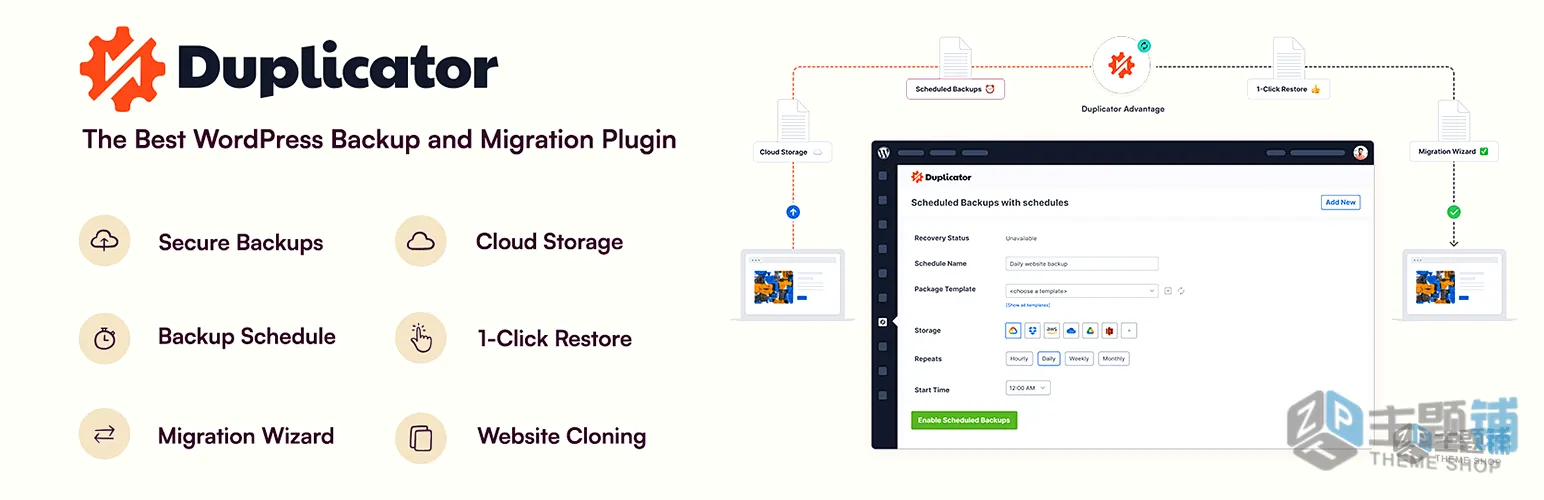
可以选择主题铺的备份插件
希望这个小工具能帮到那些被密码问题困扰的站长们!
© 版权声明
THE END






暂无评论内容