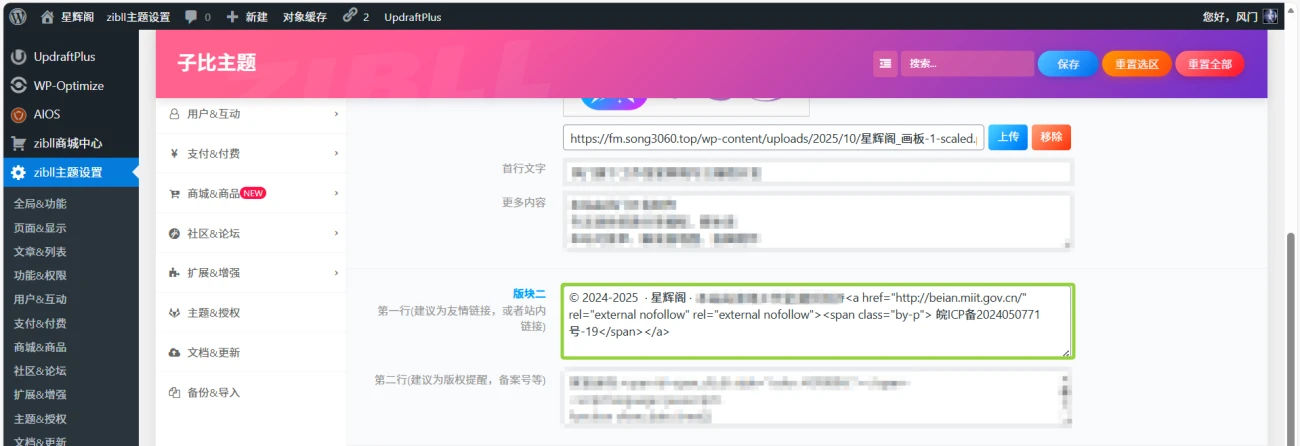



很多小伙伴都是使用WordPress子比主题,但是看着别人的网站都是很羡慕,希望能做个漂亮的网站,这里主题铺为您整理并分享这些能美化WordPress子比主题网站的CSS代码。这些代码段能为您的网站带来独特的视觉效果和功能增强。
使用说明:
- 将CSS代码添加到哪里?
通常,您可以将这些CSS代码添加到WordPress后台的“外观” -> “自定义” -> “额外CSS”区域。 - 将HTML/JS代码添加到哪里?
- 网站运行时间底部显示和脚页美化的HTML/JS代码通常需要添加到子比主题的页脚文件 (footer.php) 中。您可以通过“外观” -> “主题文件编辑器”找到并编辑
footer.php文件,但请务必小心操作并提前备份主题文件,因为错误修改可能导致网站崩溃。 - “打字彩色粒子特效”的JS代码通常也需要添加到主题的页脚文件,或者通过代码片段插件(如Code Snippets)插入到网站的全局页脚。
- 网站运行时间底部显示和脚页美化的HTML/JS代码通常需要添加到子比主题的页脚文件 (footer.php) 中。您可以通过“外观” -> “主题文件编辑器”找到并编辑
1. 文章列表左上角MAC边框美化CSS
这个CSS片段旨在为子比主题的文章列表卡片添加一个类似macOS风格的左上角红黄绿三点边框效果,同时调整了文章列表的间距和样式,让整体看起来更具设计感和活力。
/*文章列表左上角MAC边框美化 */
.posts-item.card:last-child {
    margin-bottom: 8px !important;
}
.training-camp__wrapper .header__title-wrapper {
    font-size: 16px;
}
.sec-wrapper {
    margin-bottom: 10px;
}
.training-camp__wrapper .header__title-wrapper {
    color: #22ab80;
}
.training-camp__wrapper {
    background-image: linear-gradient(150deg, #cff0fb 20%, #cbf4e4 40%);
    padding: 0 12px 12px;
    border-radius: 16px;
}
button.button---AUM5ZP.text---pn4pHz.medium---OGt5iw.header__btn {
    background: #ffffff00;
    border: 1px solid #fc3c2d00;
    border-radius: 0px;
}
.training-camp__wrapper .training-camp__header {
    padding: 24px 0 24px 12px;
    display: -webkit-flex;
    display: flex;
    background: url(/pic/kuangwenlu.png) 100% 0/433px 126px no-repeat;
}
.training-camp__wrapper .header__title-wrapper {
    display: -webkit-flex;
    display: flex;
    -webkit-align-items: center;
    align-items: center;
}
.training-camp__wrapper .title__img-wrapper {
    height: 20px;
}
.training-camp__wrapper .header__btn-wrapper {
    margin-left: auto;
    display: -webkit-flex;
    display: flex;
}
.training-camp__wrapper .header__btn-wrapper button[class*=button---] {
    height: 20px;
    line-height: 20px;
    padding: 0 12px;
}
.training-camp__wrapper .header__btn {
    display: -webkit-flex;
    display: flex;
    -webkit-align-items: center;
    align-items: center;
    font-size: 14px;
    color: #22ab80;
}
.medium---OGt5iw {
    height: 36px;
    padding: 8px 24px;
    font-size: 14px;
}
.outlined---BKvHAe,
.text---pn4pHz {
    background-color: initial;
    color: #3e454d;
}
.button---AUM5ZP {
    position: relative;
    display: inline-block;
    height: 36px;
    padding: 8px 24px;
    border-radius: 22px;
    cursor: pointer;
    border: unset;
    font-size: 14px;
    -webkit-user-select: none;
    -moz-user-select: none;
    user-select: none;
}
.ke-icon---zeGrGg+i {
    display: inline-block;
    vertical-align: middle;
}
.training-camp__wrapper>div.sec-bd {
    background-color: var(--body-bg-color);
}
.sec-wrapper .sec-bd {
    position: relative;
    display: -webkit-flex;
    display: flex;
    -webkit-flex-wrap: wrap;
    flex-wrap: wrap;
}
.training-camp__wrapper .sec-bd {
    padding: 12px;
    border-radius: 16px;
}
img.title-macyingyong {
    /* width: 120px; */
    height: 50px;
}
.posts-item.card {
    padding: 35px 10px 10px 10px !important; /* 调整卡片内边距,为MAC三点留出空间 */
}
.posts-item {
    position: relative !important;
}
.posts-item.card::before { /* 模拟MAC三点效果 */
    content: "";
    display: block;
    background: #fc625d; /* 红色点 */
    top: 13px; /* 调整位置 */
    left: 15px; /* 调整位置 */
    border-radius: 50%;
    width: 9px;
    height: 9px;
    box-shadow: 16px 0 #fdbc40, 32px 0 #35cd4b; /* 黄色和绿色点 */
    margin: 0px 2px -7px;
    z-index: 1;
    position: absolute;
}
2. 底部加群美化CSS
这段CSS为子比主题底部的图片(通常用于加群二维码或推广图片)添加了一个炫酷的动态边框动画,利用clip-path和linear-gradient创建了一个流动的彩色边框效果,非常吸引眼球。
/*底部板块三图片border*/
.footer-miniimg p {
  position: relative;
}
.footer-miniimg p:hover {
  filter: contrast(1.1);
}
.footer-miniimg p:active {
  filter: contrast(0.9);
}
.footer-miniimg p::before,
.footer-miniimg p::after {
  content: "";
  border: 2px solid;
  border-image: linear-gradient(45deg, gold, deeppink) 1; /* 渐变边框颜色 */
  position: absolute;
  top: -5px;
  left: -5px;
  right: -5px;
  bottom: -5px;
  animation: clippath 3s infinite; /* 边框动画 */
}
.footer-miniimg p::before {
  animation: clippath 3s infinite -1.5s linear; /* 错位动画,形成叠加效果 */
}
@keyframes clippath {
  0%,
  100% {
    clip-path: inset(0 0 96% 0);
    filter: hue-rotate(0deg);
  }
  25% {
    clip-path: inset(0 96% 0 0);
  }
  50% {
    clip-path: inset(96% 0 0 0);
    filter: hue-rotate(360deg);
  }
  75% {
    clip-path: inset(0 0 0 96%);
  }
}
3. 右键复制美化CSS(自定义文字选中样式)
这个CSS片段改变了子比主题网站上文字被选中时的默认视觉效果。它去除了选中时的背景色和文字阴影,并将选中的文字颜色改为蓝色,从而实现一种“无框选”但有颜色提示的选中效果。
/* 子比主题 - 自定义文字选中样式(无系统边框+蓝色文字+无额外边框) */
::selection {
    background: transparent !important; /* 去除选中时的背景色(无框选视觉) */
    color: #007bff !important; /* 选中文字设为蓝色(可替换#1677ff等子比主题蓝) */
    text-shadow: none !important; /* 去除文字阴影,避免边框感 */
}
::-moz-selection { /* 火狐浏览器兼容 */
    background: transparent !important;
    color: #007bff !important;
    text-shadow: none !important;
}
/* 若需禁止特定区域文字被框选,可添加以下类名控制 */
.no-select {
    user-select: none !important; /* 直接禁止文字被选中 */
    -webkit-user-select: none !important;
    -moz-user-select: none !important;
}
4. 备案号彩色美化CSS
这个CSS代码为子比主题底部的备案号文字添加了炫丽的渐变彩色流动效果,使其在视觉上更加突出和独特。
CSS代码:
/*底部备案炫彩*/
.by-p {
        font-weight: 600;
        color: #8c888b; /* 默认颜色,会被背景渐变覆盖 */
        background: -webkit-linear-gradient(45deg, #70f7fe, #fbd7c6, #fdefac, #bfb5dd, #bed5f5); /* 渐变背景 */
        background: -moz-linear-gradient(45deg, #70f7fe, #fbd7c6, #fdefac, #bfb5dd, #bed5f5);
        background: -ms-linear-gradient(45deg, #70f7fe, #fbd7c6, #fdefac, #bfb5dd, #bed5f5);
        color: transparent; /* 将文字颜色设为透明,露出背景渐变 */
        -webkit-background-clip: text; /* 将背景裁剪为文字形状 */
        animation: ran 20s linear infinite; /* 渐变流动动画 */
    }
    @keyframes ran {
        from {
            background-position: 0;
        }
        to {
            background-position: 2000px 0;
        }
}HTML配合代码(请放置到子比主题的footer.php文件或相关区域):
<a href="http://beian.miit.gov.cn/" rel="external nofollow" target="_blank"><span class="by-p">这里填写你的备案号</span></a>注意:请务必将这里填写你的备案号替换为您的实际备案号,并将href链接修改为工信部备案查询的官方链接。
![图片[1]-WordPress子比主题几个美化CSS代码分享-主题铺](https://cdn.zhutipu.com/wp-content/uploads/2025/12/20251227210633533.webp/ztp)
5. 打字彩色粒子特效JS代码
这个是一个JavaScript实现的打字彩色粒子特效,当用户在可编辑区域(如输入框、文本域)或选中文本时,会在光标位置产生彩色粒子效果。
JavaScript代码(请放置到子比主题的footer.php文件末尾,</body>标签之前,或者通过代码片段插件插入):
<!--彩色粒子特效-->
<script>
(function webpackUniversalModuleDefinition(a, b) {
    if (typeof exports === "object" && typeof module === "object") {
        module.exports = b()
    } else {
        if (typeof define === "function" && define.amd) {
            define([], b)
        } else {
            if (typeof exports === "object") {
                exports["POWERMODE"] = b()
            } else {
                a["POWERMODE"] = b()
            }
        }
    }
})(this, function() {
    return (function(a) {
        var b = {};

        function c(e) {
            if (b[e]) {
                return b[e].exports
            }
            var d = b[e] = {
                exports: {},
                id: e,
                loaded: false
            };
            a[e].call(d.exports, d, d.exports, c);
            d.loaded = true;
            return d.exports
        }
        c.m = a;
        c.c = b;
        c.p = "";
        return c(0)
    })([function(c, g, b) {
        var d = document.createElement("canvas");
        d.width = window.innerWidth;
        d.height = window.innerHeight;
        d.style.cssText = "position:fixed;top:0;left:0;pointer-events:none;z-index:999999";
        window.addEventListener("resize", function() {
            d.width = window.innerWidth;
            d.height = window.innerHeight
        });
        document.body.appendChild(d);
        var a = d.getContext("2d");
        var n = [];
        var j = 0;
        var k = 120;
        var f = k;
        var p = false;
        o.shake = true; // 默认开启屏幕震动
        o.colorful = true; // 默认开启彩色粒子

        function l(r, q) {
            return Math.random() * (q - r) + r
        }
        function m(r) {
            if (o.colorful) {
                var q = l(0, 360);
                return "hsla(" + l(q - 10, q + 10) + ", 100%, " + l(50, 80) + "%, " + 1 + ")"
            } else {
                return window.getComputedStyle(r).color
            }
        }
        function e() {
            var t = document.activeElement;
            var v;
            if (t.tagName === "TEXTAREA" || (t.tagName === "INPUT" && t.getAttribute("type") === "text")) {
                var u = b(1)(t, t.selectionStart);
                v = t.getBoundingClientRect();
                return {
                    x: u.left + v.left,
                    y: u.top + v.top,
                    color: m(t)
                }
            }
            var s = window.getSelection();
            if (s.rangeCount) {
                var q = s.getRangeAt(0);
                var r = q.startContainer;
                if (r.nodeType === document.TEXT_NODE) {
                    r = r.parentNode
                }
                v = q.getBoundingClientRect();
                return {
                    x: v.left,
                    y: v.top,
                    color: m(r)
                }
            }
            return {
                x: 0,
                y: 0,
                color: "transparent"
            }
        }
        function h(q, s, r) {
            return {
                x: q,
                y: s,
                alpha: 1,
                color: r,
                velocity: {
                    x: -1 + Math.random() * 2,
                    y: -3.5 + Math.random() * 2
                }
            }
        }
        function o() {
            var t = e();
            if (o.shake && t.color !== "transparent") {
                j = f;
            }
            for (var w = 0; w < 10; w++) {
                n.push(h(t.x, t.y, t.color))
            }
        }
        o.colorful = false;
        o.init = function() {
            window.addEventListener("keyup", o);
        };
        o.canvas = d;
        o.set = function(q) {
            Object.keys(q).forEach(function(r) {
                o[r] = q[r];
            });
        };
        o.addParticle = function(x, y, color) {
            n.push(h(x, y, color));
        }

        var animationFrameId;

        function i() {
            if (!animationFrameId) {
                animationFrameId = requestAnimationFrame(i);
            }
            a.clearRect(0, 0, d.width, d.height);
            for (var q = 0; q < n.length; q++) {
                var r = n[q];
                r.x += r.velocity.x;
                r.y += r.velocity.y;
                r.velocity.y += 0.075;
                r.alpha *= 0.98;
                a.beginPath();
                a.arc(r.x, r.y, 1.5, 0, 2 * Math.PI);
                a.fillStyle = r.color;
                a.globalAlpha = r.alpha;
                a.fill()
            }
            if (j > 0) {
                j -= 1;
                d.style.transform = "translate(" + l(-j, j) + "px, " + l(-j, j) + "px)";
            } else {
                d.style.transform = "";
            }
            n = n.filter(function(s) {
                return s.alpha > 0.01;
            });
            if (n.length === 0 && j === 0) {
                cancelAnimationFrame(animationFrameId);
                animationFrameId = null;
            } else {
                requestAnimationFrame(i);
            }
        }
        o.start = function() {
            if (!animationFrameId) {
                animationFrameId = requestAnimationFrame(i);
            }
        };

        window.addEventListener("keyup", o); // 监听键盘抬起事件
        o.init();
        o.start();

        g.exports = o;
    }, function(c, b, d) {
        (function() {
            var f = {};
            var a = ["direction", "boxSizing", "width", "height", "overflowX", "overflowY", "borderTopWidth", "borderRightWidth", "borderBottomWidth", "borderLeftWidth", "paddingTop", "paddingRight", "paddingBottom", "paddingLeft", "fontStyle", "fontVariant", "fontWeight", "fontStretch", "fontSize", "fontSizeAdjust", "lineHeight", "fontFamily", "textAlign", "textTransform", "textIndent", "textDecoration", "letterSpacing", "wordSpacing", "whiteSpace", "tabSize", "MozTabSize"];
            var e = ["paddingLeft", "paddingRight", "borderLeftWidth", "borderRightWidth"];
            b.exports = function(t, i) {
                var s = document.createElement("div");
                document.body.appendChild(s);
                var j = t.cloneNode(true);
                j.style.opacity = 0;
                var g = t.tagName === "INPUT" || t.tagName === "TEXTAREA" ? "value" : "innerHTML";
                j[g] = t[g].substring(0, i);
                j.style.position = "absolute";
                j.style.top = t.offsetTop + "px";
                j.style.left = t.offsetLeft + "px";
                j.style.width = t.offsetWidth + "px";
                j.style.height = t.offsetHeight + "px";
                j.style.overflow = "hidden";
                if (t.tagName !== "INPUT") {
                    j.style.wordWrap = "break-word"
                }
                for (var r = a.length - 1; r >= 0; r--) {
                    var u = a[r];
                    j.style[u] = h(t, u)
                }
                s.appendChild(j);
                var k = {
                    left: j.offsetWidth,
                    top: j.offsetHeight
                };
                for (var r = e.length - 1; r >= 0; r--) {
                    k.left -= parseFloat(h(t, e[r]))
                }
                s.removeChild(j);
                document.body.removeChild(s);
                return k
            };

            function h(i, j) {
                if (j in f) {
                    return f[j]
                }
                return f[j] = getComputedStyle(i, null).getPropertyValue(j)
            }
        }).call(this)
    }])
});

POWERMODE.colorful = true; // 彩色粒子
POWERMODE.shake = false; // 不震动
document.body.addEventListener('input', POWERMODE.debounce(function() {
    POWERMODE.start();
}, 200));

</script>
注意事项:
- 此脚本可能对网站性能有轻微影响。
POWERMODE.shake = true;控制屏幕震动,POWERMODE.colorful = true;控制粒子颜色。您可以根据喜好修改为false。document.body.addEventListener('input', POWERMODE.debounce(function() { POWERMODE.start(); }, 200));绑定了输入事件,触发粒子效果。
6. 苹果设备提示弹窗 – 自定义CSS
这个CSS片段用于美化一个模拟苹果风格的提示弹窗。它定义了弹窗的样式、动画、背景蒙版以及内部元素的布局和配色,使其看起来现代且用户友好。
/* 苹果设备提示弹窗 - 自定义CSS */
.apple-alert {
    position: fixed;
    top: 50%;
    left: 50%;
    transform: translate(-50%, -50%) scale(0.9); /* 初始状态略小并居中 */
    width: 90%;
    max-width: 450px;
    background: #ffffff;
    border-radius: 16px;
    box-shadow: 0 10px 30px rgba(0, 0, 0, 0.2);
    z-index: 10000;
    opacity: 0; /* 初始隐藏 */
    transition: all 0.3s ease-out; /* 动画过渡 */
    font-family: -apple-system, BlinkMacSystemFont, 'Segoe UI', Roboto, Oxygen, sans-serif; /* 苹果风格字体 */
    overflow: hidden;
    pointer-events: none; /* 初始不可交互 */
}
.apple-alert.active { /* 激活状态 */
    opacity: 1;
    transform: translate(-50%, -50%) scale(1);
    pointer-events: auto; /* 可交互 */
}
.apple-alert-header { /* 弹窗头部 */
    background: #1a73e8; /* 蓝色背景 */
    color: white;
    padding: 22px 24px;
    display: flex;
    align-items: center;
}
.apple-alert-icon { /* 头部图标 */
    font-size: 28px;
    margin-right: 16px;
    width: 40px;
    height: 40px;
    background: rgba(255, 255, 255, 0.2);
    border-radius: 50%;
    display: flex;
    align-items: center;
    justify-content: center;
}
.apple-alert-title { /* 头部标题 */
    font-size: 1.3rem;
    font-weight: 600;
}
.apple-alert-content { /* 弹窗内容区 */
    padding: 28px 24px 20px;
    color: #202124;
    line-height: 1.6;
}
.apple-alert-text { /* 内容文本 */
    margin-bottom: 18px;
    font-size: 1.05rem;
}
.apple-alert-actions { /* 按钮操作区 */
    display: flex;
    flex-direction: column;
    padding: 10px 16px 20px;
}
.apple-alert-btn { /* 按钮样式 */
    font-family: inherit;
    font-weight: 600;
    font-size: 0.95rem;
    letter-spacing: 0.015em;
    padding: 14px 16px;
    border-radius: 8px;
    border: none;
    background: none;
    cursor: pointer;
    color: #1a73e8;
    transition: background-color 0.2s;
    text-align: center;
    width: 100%;
    margin-bottom: 12px;
}
.apple-alert-btn:hover {
    background-color: rgba(26, 115, 232, 0.08);
}
.apple-alert-btn:active {
    background-color: rgba(26, 115, 232, 0.16);
}
.apple-alert-btn.primary { /* 主按钮样式 */
    background-color: #1a73e8;
    color: white;
}
.apple-alert-btn.primary:hover {
    background-color: #0d62c9;
}
.apple-alert-dont-show { /* “不再显示”选项 */
    display: flex;
    align-items: center;
    margin: 0 0 20px 0;
    padding: 12px 16px;
    background: rgba(26, 115, 232, 0.05);
    border-radius: 8px;
    font-size: 0.95rem;
    cursor: pointer;
}
.apple-alert-dont-show input { /* 复选框 */
    margin-right: 12px;
    width: 18px;
    height: 18px;
    cursor: pointer;
}
.apple-alert-backdrop { /* 背景蒙版 */
    position: fixed;
    top: 0;
    left: 0;
    width: 100%;
    height: 100%;
    background-color: rgba(0, 0, 0, 0.5);
    z-index: 9999;
    opacity: 0; /* 初始隐藏 */
    transition: opacity 0.3s ease-out;
    backdrop-filter: blur(4px); /* 背景模糊效果 */
    pointer-events: none; /* 初始不可交互 */
}
.apple-alert-backdrop.active { /* 激活状态 */
    opacity: 1;
    pointer-events: auto;
}
注意: 这段CSS代码需要配合相应的HTML结构和JavaScript逻辑才能实现完整的弹窗功能。它只提供了样式定义。
7. 网站运行时间底部显示
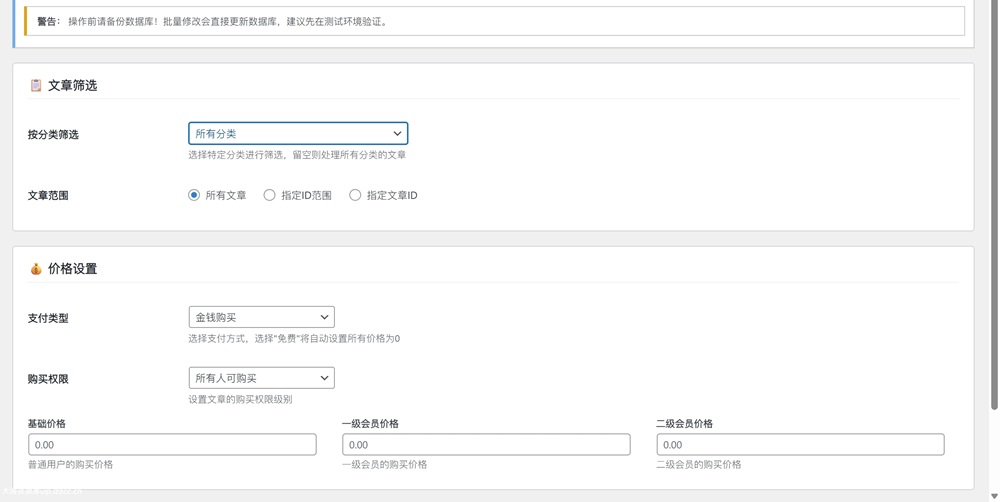
这个JavaScript代码段用于在网站底部显示网站已安全运行的天数、小时、分钟和秒数,并实时更新。
![图片[2]-WordPress子比主题几个美化CSS代码分享-主题铺](https://cdn.zhutipu.com/wp-content/uploads/2025/12/20251227210657872.webp/ztp)
JavaScript代码(请放置到子比主题的footer.php文件或相关位置):
安全运行:<span id=span_dt_dt style="color: #2F889A;"></span>
<script language=javascript>
function show_date_time(){
window.setTimeout("show_date_time()", 1000);
// 请修改这里的日期为您的网站上线日期
BirthDay=new Date("1/1/2025 1:1:1"); // 格式为 月/日/年 时:分:秒
today=new Date();
timeold=(today.getTime()-BirthDay.getTime());
sectimeold=timeold/1000
secondsold=Math.floor(sectimeold);
msPerDay=24*60*60*1000
e_daysold=timeold/msPerDay
daysold=Math.floor(e_daysold);
e_hrsold=(e_daysold-daysold)*24;
hrsold=Math.floor(e_hrsold);
e_minsold=(e_hrsold-hrsold)*60;
minsold=Math.floor((e_hrsold-hrsold)*60);
seconds=Math.floor((e_minsold-minsold)*60);
span_dt_dt.innerHTML='<font style=color:#C40000>'+daysold+'</font> 天 <font style=color:#C40000>'+hrsold+'</font> 时 <font style=color:#C40000>'+minsold+'</font> 分 <font style=color:#C40000>'+seconds+'</font> 秒';
}
show_date_time();
</script>
重要: 请将代码中的BirthDay=new Date("1/1/2025 1:1:1");修改为您的网站实际建立日期。
8. 脚页美化(徽章按钮组)
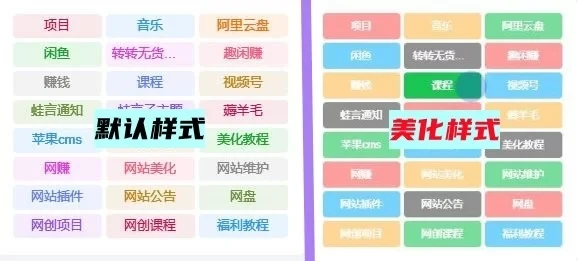
这个CSS和HTML代码段为子比主题的页脚创建了一组精美的徽章式按钮,可以用来展示网站托管信息、主题名称、站点地图、隐私声明等链接。它们具有悬停动画和响应式布局。
CSS代码:
<style>
.button-container {
  width: 100%;
  margin: 20px 0;
}
.button-row {
  display: flex;
  flex-wrap: wrap;
  justify-content: flex-start;
  gap: 8px; /* 按钮之间的间距 */
  margin-bottom: 10px;
}
.button-first-row {
  width: 100%;
  display: flex;
  justify-content: flex-start;
  gap: 8px;
  margin-bottom: 8px;
}
.github-badge {
  display: flex;
  border-radius: 4px;
  font-size: 12px;
  color: #fff;
  line-height: 15px;
  background-color: #abbac3; /* 默认灰色背景 */
  overflow: hidden;
  text-shadow: none;
  box-shadow: 0 2px 4px rgba(0,0,0,0.1);
  transition: transform 0.2s ease; /* 悬停动画 */
}
.github-badge:hover {
  transform: translateY(-2px); /* 悬停上移 */
  box-shadow: 0 4px 8px rgba(0,0,0,0.15); /* 悬停阴影 */
}
.github-badge .badge-subject { /* 徽章左侧文本 */
  display: inline-block;
  background-color: #ffa500; /* 默认橙色 */
  padding: 4px 8px 4px 10px;
  font-weight: 600;
}
.github-badge a { /* 徽章右侧链接 */
  display: inline-block;
  padding: 4px 10px;
  text-decoration: none;
  color: #fff !important;
  font-weight: 500;
}
/* 各类颜色背景 */
.github-badge .bg-cai {
  background-image: linear-gradient(120deg, #3ca5f6, #a86af9);
}
.github-badge .bg-green {
  background-color: #3bca6e;
}
.github-badge .bg-blue {
  background-color: #007bff;
}
.github-badge .bg-orange {
  background-color: #ff7f50;
}
.github-badge .bg-red {
  background-color: #f55066;
}
.github-badge .bg-fen {
  background-color: #e76dcb;
}
.github-badge .bg-purple {
  background-color: #6a5acd;
}
@media (max-width: 768px) { /* 移动端适配 */
  .button-row,
  .button-first-row {
    justify-content: center; /* 居中显示 */
  }
}
</style>HTML代码(请放置到子比主题的footer.php文件或相关位置):
<div class="button-container">
  <div class="button-first-row">
    <div class="github-badge">
      <span class="badge-subject">网站托管于</span>
      <a class="bg-cai" href="(填写地址)aff/CNKVIIGL" rel="external nofollow" target="_blank">
        名称
      </a>
    </div>

    <div class="github-badge">
      <span class="badge-subject">网站主题为</span>
      <a class="bg-green" href="(填写地址)" rel="external nofollow" target="_blank">
        子比主题
      </a>
    </div>
  </div>

  <div class="button-row">

    <div class="github-badge">
      <a class="bg-orange" href="(填写地址)wp-sitemap.xml" rel="external nofollow" target="_blank">
        站点地图
      </a>
    </div>

    <div class="github-badge">
      <a class="bg-red" href="(填写地址)?page_id=3" rel="external nofollow" target="_blank">
        隐私声明
      </a>
    </div>

    <div class="github-badge">
      <a class="bg-fen" href="(填写地址)agreement" rel="external nofollow" target="_blank">
        用户协议
      </a>
    </div>

    <div class="github-badge">
      <a class="bg-purple" href="(填写地址)/267.html" rel="external nofollow" target="_blank">
        关于我们
      </a>
    </div>
  </div>
</div>
重要:
- 请将HTML代码中所有
(填写地址)替换为您网站的实际URL。 - 将
名称替换为您托管服务商的名称。 - 确保链接地址正确,尤其是隐私声明、用户协议、关于我们等页面的
page_id或slug。
![图片[3]-WordPress子比主题几个美化CSS代码分享-主题铺](https://cdn.zhutipu.com/wp-content/uploads/2025/12/20251227210704361.webp/ztp)
主题铺温馨提示:
- 在修改任何主题文件之前,务必备份您的主题文件和整个网站。
- 建议使用子主题来添加这些自定义代码,以避免在主题更新时丢失您的修改。
- 某些CSS代码可能需要根据您的具体子比主题版本和网站结构进行微调。
- 对于JavaScript代码,如果可能,请使用专门的代码片段插件(如Code Snippets)来管理,以避免直接修改主题文件带来的风险。
希望这些美化代码能让您的WordPress子比主题网站焕然一新!







暂无评论内容