


AI 智能摘要
一个设计精美的动态时钟,不仅能为用户提供实时的时间信息,还能通过其独特的视觉效果,为网站增添一份科技感和精致度。今天,主题铺为大家带来两个精心设计的动态HTML时钟样式,它集时间显示、日期、问候语和节日提醒于一体,并提供了两种风格选择,完美适配各种网站侧边栏或内容区域。
在网站设计中,动态且实用的元素能够显著提升用户体验和网站的吸引力。一个设计精美的动态时钟,不仅能为用户提供实时的时间信息,还能通过其独特的视觉效果,为网站增添一份科技感和精致度。今天,主题铺为大家带来两个精心设计的动态HTML时钟样式,它集时间显示、日期、问候语和节日提醒于一体,并提供了两种风格选择,完美适配各种网站侧边栏或内容区域。
时钟代码1
<!DOCTYPE html>
<html lang="zh-CN">
<head>
    <meta charset="UTF-8">
    <meta name="viewport" content="width=device-width, initial-scale=1.0">
    <title>QFY侧栏时钟</title>
    <style>
        .dynamic-clock {
            background: linear-gradient(135deg, #6e8efb, #a777e3);
            border-radius: 20px;
            padding: 30px;
            box-shadow: 0 10px 30px rgba(0, 0, 0, 0.2);
            margin: 20px auto;
            max-width: 500px;
            color: white;
            font-family: 'Microsoft YaHei', sans-serif;
            position: relative;
            overflow: hidden;
        }
        .dynamic-clock::before {
            content: '';
            position: absolute;
            top: -50%;
            left: -50%;
            width: 200%;
            height: 200%;
            background: radial-gradient(circle, rgba(255,255,255,0.1) 0%, rgba(255,255,255,0) 70%);
            animation: rotate 20s linear infinite;
            z-index: 0;
        }
        @keyframes rotate {
            0% { transform: rotate(0deg); }
            100% { transform: rotate(360deg); }
        }
        .clock-container { position: relative; z-index: 1; }
        .year-display {
            text-align: center;
            font-size: 1.3em;
            margin-bottom: 5px;
            font-weight: 600;
            display: flex;
            justify-content: center;
            gap: 15px;
        }
        .time-section { text-align: center; margin-bottom: 15px; }
        .time-display {
            font-size: 3.5em;
            font-weight: 300;
            letter-spacing: 2px;
            display: flex;
            justify-content: center;
            align-items: center;
        }
        .time-display span { margin: 0 5px; }
        .colon {
            animation: pulse 1s infinite;
            position: relative;
            top: -5px;
        }
        @keyframes pulse {
            0%, 100% { opacity: 1; }
            50% { opacity: 0.5; }
        }
        .date-section {
            display: flex;
            justify-content: space-between;
            margin: 15px 0;
            font-size: 1.1em;
            background: rgba(255, 255, 255, 0.15);
            padding: 12px;
            border-radius: 10px;
            backdrop-filter: blur(5px);
        }
        .date-item { text-align: center; flex: 1; }
        .date-label {
            font-size: 0.8em;
            opacity: 0.8;
            margin-bottom: 5px;
        }
        .date-value { font-weight: 600; }
        .greeting-section {
            text-align: center;
            margin: 20px 0 10px;
            padding-top: 15px;
            border-top: 1px solid rgba(255, 255, 255, 0.2);
        }
        .greeting-text {
            font-size: 1.5em;
            font-weight: 500;
            margin-bottom: 8px;
        }
        .greeting-tip {
            font-size: 0.95em;
            opacity: 0.9;
            line-height: 1.5;
            margin-bottom: 15px;
        }
        .next-festival {
            background: rgba(0, 0, 0, 0.1);
            padding: 10px;
            border-radius: 8px;
            font-size: 0.95em;
            margin-top: 10px;
        }
        .festival-message { font-weight: 600; }
        body.dark-theme  .dynamic-clock {
            background: linear-gradient(135deg, #434343, #000000);
            box-shadow: 0 10px 30px rgba(0, 0, 0, 0.4);
        }
    </style>
</head>
<body>
    <div class="dynamic-clock">
        <div class="clock-container">
            <div class="year-display">
                <span>2025年</span>
                <span>乙巳年</span>
                <span>蛇年</span>
            </div>

            <div class="time-section">
                <div class="time-display">
                    <span id="hours">13</span>
                    <span class="colon">:</span>
                    <span id="minutes">36</span>
                    <span class="colon">:</span>
                    <span id="seconds">00</span>
                </div>
            </div>

            <div class="date-section">
                <div class="date-item">
                    <div class="date-label">公历日期</div>
                    <div class="date-value" id="solar-date">9月26日</div>
                </div>
                <div class="date-item">
                    <div class="date-label">农历日期</div>
                    <div class="date-value" id="lunar-date">八月初五</div>
                </div>
                <div class="date-item">
                    <div class="date-label">星期</div>
                    <div class="date-value" id="weekday">星期五</div>
                </div>
            </div>

            <div class="greeting-section">
                <div class="greeting-text" id="greeting">下午好</div>
                <div class="greeting-tip" id="tip">金秋时节,愿您收获满满</div>
                <div class="next-festival" id="next-festival">
                    <div class="festival-message">距离国庆节还有5天</div>
                </div>
            </div>
        </div>
    </div>

    <script>
        // 2025年重要节日(国家授时中心数据)
        const festivals = [
            { name: "国庆节", date: new Date(2025, 9, 1), message: "🇨🇳 国庆快乐!盛世华诞,普天同庆" },
            { name: "中秋节", date: new Date(2025, 9, 6), message: "🎑 中秋快乐!月圆人团圆" },
            { name: "元旦", date: new Date(2026, 0, 1), message: "🎉 元旦快乐!新年新气象" },
            { name: "春节", date: new Date(2026, 1, 17), message: "🧧 春节快乐!乙巳年大吉" }
        ];

        function updateTime() {
            const now = new Date();
            const hours = now.getHours();

            // 更新时间显示
            document.getElementById('hours').textContent  = hours.toString().padStart(2,'0');
            document.getElementById('minutes').textContent  = now.getMinutes().toString().padStart(2,'0');
            document.getElementById('seconds').textContent  = now.getSeconds().toString().padStart(2,'0');

            // 更新日期显示
            document.getElementById('solar-date').textContent  = `${now.getMonth()+1} 月${now.getDate()} 日`;
            document.getElementById('weekday').textContent  = ['日','一','二','三','四','五','六'][now.getDay()];

            // 更新问候语
            updateGreeting(hours);
            // 更新节日提醒
            updateFestivalReminder(now);
        }

        function updateGreeting(hours) {
            let greeting, tip;
            if (hours < 5) {
                greeting = "深夜好";
                tip = "夜深人静,注意休息";
            } else if (hours < 8) {
                greeting = "清晨好";
                tip = "晨光熹微,一日之计在于晨";
            } else if (hours < 11) {
                greeting = "上午好";
                tip = "精力充沛,工作顺利";
            } else if (hours < 13) {
                greeting = "中午好";
                tip = "午间小憩,补充能量";
            } else if (hours < 18) {
                greeting = "下午好";
                tip = "金秋时节,愿您收获满满";
            } else if (hours < 22) {
                greeting = "晚上好";
                tip = "华灯初上,享受闲暇时光";
            } else {
                greeting = "夜深了";
                tip = "早睡早起,养生之道";
            }
            document.getElementById('greeting').textContent  = greeting;
            document.getElementById('tip').textContent  = tip;
        }

        function updateFestivalReminder(now) {
            const oneDay = 24 * 60 * 60 * 1000;
            let nextFestival = null;
            let minDays = Infinity;

            // 找出最近的未来节日
            festivals.forEach(fest  => {
                const diffDays = Math.ceil((fest.date  - now) / oneDay);
                if (diffDays >= 0 && diffDays < minDays) {
                    minDays = diffDays;
                    nextFestival = fest;
                }
            });

            // 更新显示
            const festivalEl = document.getElementById('next-festival');
            if (nextFestival) {
                if (minDays === 0) {
                    festivalEl.innerHTML  = `<div class="festival-message">${nextFestival.message}</div>`;
                } else {
                    festivalEl.innerHTML  = `<div class="festival-message">距离${nextFestival.name} 还有${minDays}天</div>`;
                }
            } else {
                festivalEl.style.display  = 'none';
            }
        }

        // 初始化
        document.addEventListener('DOMContentLoaded',  () => {
            updateTime();
            setInterval(updateTime, 1000);

            // 暗色模式适配
            if (window.matchMedia('(prefers-color-scheme:  dark)').matches) {
                document.body.classList.add('dark-theme');
            }
        });
    </script>
</body>
</html>
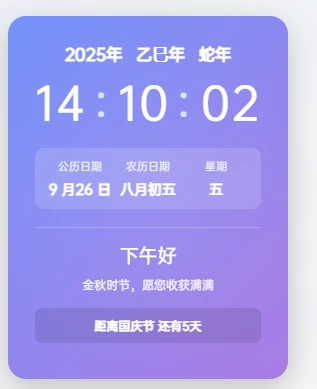
效果如下
![图片[1]-动态HTML代码时钟样式分享:为您的网站增添生动与实用-主题铺](https://cdn.zhutipu.com/wp-content/uploads/2025/09/20250927161132949.webp/ztp)
时钟代码2
<!DOCTYPE html>
<html lang="zh-CN">
<head>
<meta charset="UTF-8">
<meta name="viewport" content="width=device-width, initial-scale=1.0">
<title>QFY侧栏时钟</title>
<style>
.dynamic-clock {
background: white;
border-radius: 20px;
padding: 30px;
box-shadow: 0 10px 30px rgba(0, 0, 0, 0.1);
margin: 20px auto;
max-width: 500px;
color: #333;
font-family: 'Microsoft YaHei', sans-serif;
position: relative;
overflow: hidden;
}
.dynamic-clock::before {
content: '';
position: absolute;
top: -50%;
left: -50%;
width: 200%;
height: 200%;
background: radial-gradient(circle, rgba(0,0,0,0.05) 0%, rgba(0,0,0,0) 70%);
animation: rotate 20s linear infinite;
z-index: 0;
}
@keyframes rotate {
0% { transform: rotate(0deg); }
100% { transform: rotate(360deg); }
}
.clock-container { position: relative; z-index: 1; }
.year-display {
text-align: center;
font-size: 1.3em;
margin-bottom: 5px;
font-weight: 600;
display: flex;
justify-content: center;
gap: 15px;
}
.time-section { text-align: center; margin-bottom: 15px; }
.time-display {
font-size: 3.5em;
font-weight: 300;
letter-spacing: 2px;
display: flex;
justify-content: center;
align-items: center;
}
.time-display span { margin: 0 5px; }
.colon {
animation: pulse 1s infinite;
position: relative;
top: -5px;
}
@keyframes pulse {
0%, 100% { opacity: 1; }
50% { opacity: 0.5; }
}
.date-section {
display: flex;
justify-content: space-between;
margin: 15px 0;
font-size: 1.1em;
background: rgba(0, 0, 0, 0.03);
padding: 12px;
border-radius: 10px;
}
.date-item { text-align: center; flex: 1; }
.date-label {
font-size: 0.8em;
opacity: 0.8;
margin-bottom: 5px;
}
.date-value { font-weight: 600; }
.greeting-section {
text-align: center;
margin: 20px 0 10px;
padding-top: 15px;
border-top: 1px solid rgba(0, 0, 0, 0.1);
}
.greeting-text {
font-size: 1.5em;
font-weight: 500;
margin-bottom: 8px;
}
.greeting-tip {
font-size: 0.95em;
opacity: 0.9;
line-height: 1.5;
margin-bottom: 15px;
}
.next-festival {
padding: 10px;
border-radius: 8px;
font-size: 0.95em;
margin-top: 10px;
}
.festival-message { font-weight: 600; }
body.dark-theme  .dynamic-clock {
background: linear-gradient(135deg, #434343, #000000);
box-shadow: 0 10px 30px rgba(0, 0, 0, 0.4);
color: white;
}
body.dark-theme  .date-section {
background: rgba(255, 255, 255, 0.15);
}
body.dark-theme  .greeting-section {
border-top: 1px solid rgba(255, 255, 255, 0.2);
}
body.dark-theme  .next-festival {
background: rgba(0, 0, 0, 0.1);
}
</style>
</head>
<body>
<div class="dynamic-clock">
<div class="clock-container">
<div class="year-display">
<span>2025年</span>
<span>乙巳年</span>
<span>蛇年</span>
</div>

<div class="time-section">
<div class="time-display">
<span id="hours">13</span>
<span class="colon">:</span>
<span id="minutes">36</span>
<span class="colon">:</span>
<span id="seconds">00</span>
</div>
</div>

<div class="date-section">
<div class="date-item">
<div class="date-label">公历日期</div>
<div class="date-value" id="solar-date">9月26日</div>
</div>
<div class="date-item">
<div class="date-label">农历日期</div>
<div class="date-value" id="lunar-date">八月初五</div>
</div>
<div class="date-item">
<div class="date-label">星期</div>
<div class="date-value" id="weekday">星期五</div>
</div>
</div>

<div class="greeting-section">
<div class="greeting-text" id="greeting">下午好</div>
<div class="greeting-tip" id="tip">金秋时节,愿您收获满满</div>
<div class="next-festival" id="next-festival">
<div class="festival-message">距离国庆节还有5天</div>
</div>
</div>
</div>
</div>

<script>
// 2025年重要节日(国家授时中心数据)
const festivals = [
{ name: "国庆节", date: new Date(2025, 9, 1), message: "🇨🇳 国庆快乐!盛世华诞,普天同庆" },
{ name: "中秋节", date: new Date(2025, 9, 6), message: "🎑 中秋快乐!月圆人团圆" },
{ name: "元旦", date: new Date(2026, 0, 1), message: "🎉 元旦快乐!新年新气象" },
{ name: "春节", date: new Date(2026, 1, 17), message: "🧧 春节快乐!乙巳年大吉" }
];

function updateTime() {
const now = new Date();
const hours = now.getHours();

// 更新时间显示
document.getElementById('hours').textContent  = hours.toString().padStart(2,'0');
document.getElementById('minutes').textContent  = now.getMinutes().toString().padStart(2,'0');
document.getElementById('seconds').textContent  = now.getSeconds().toString().padStart(2,'0');

// 更新日期显示
document.getElementById('solar-date').textContent  = `${now.getMonth()+1}  月${now.getDate()}  日`;
document.getElementById('weekday').textContent  = ['日','一','二','三','四','五','六'][now.getDay()];

// 更新问候语
updateGreeting(hours);
// 更新节日提醒
updateFestivalReminder(now);
}

function updateGreeting(hours) {
let greeting, tip;
if (hours < 5) {
greeting = "深夜好";
tip = "夜深人静,注意休息";
} else if (hours < 8) {
greeting = "清晨好";
tip = "晨光熹微,一日之计在于晨";
} else if (hours < 11) {
greeting = "上午好";
tip = "精力充沛,工作顺利";
} else if (hours < 13) {
greeting = "中午好";
tip = "午间小憩,补充能量";
} else if (hours < 18) {
greeting = "下午好";
tip = "金秋时节,愿您收获满满";
} else if (hours < 22) {
greeting = "晚上好";
tip = "华灯初上,享受闲暇时光";
} else {
greeting = "夜深了";
tip = "早睡早起,养生之道";
}
document.getElementById('greeting').textContent  = greeting;
document.getElementById('tip').textContent  = tip;
}

function updateFestivalReminder(now) {
const oneDay = 24 * 60 * 60 * 1000;
let nextFestival = null;
let minDays = Infinity;

// 找出最近的未来节日
festivals.forEach(fest  => {
const diffDays = Math.ceil((fest.date  - now) / oneDay);
if (diffDays >= 0 && diffDays < minDays) {
minDays = diffDays;
nextFestival = fest;
}
});

// 更新显示
const festivalEl = document.getElementById('next-festival');
if (nextFestival) {
if (minDays === 0) {
festivalEl.innerHTML  = `<div class="festival-message">${nextFestival.message}</div>`;
} else {
festivalEl.innerHTML  = `<div class="festival-message">距离${nextFestival.name}  还有${minDays}天</div>`;
}
} else {
festivalEl.style.display  = 'none';
}
}

// 初始化
document.addEventListener('DOMContentLoaded',  () => {
updateTime();
setInterval(updateTime, 1000);

// 暗色模式适配
if (window.matchMedia('(prefers-color-scheme:  dark)').matches) {
document.body.classList.add('dark-theme');
}
});
</script>
</body>
</html>
效果如下
![图片[2]-动态HTML代码时钟样式分享:为您的网站增添生动与实用-主题铺](https://cdn.zhutipu.com/wp-content/uploads/2025/09/20250927161136523.webp/ztp)
![图片[3]-动态HTML代码时钟样式分享:为您的网站增添生动与实用-主题铺](https://cdn.zhutipu.com/wp-content/uploads/2025/09/20250927161139848.webp/ztp)
核心功能与亮点:
这款动态时钟不仅显示当前时间,还融入了多项实用功能和美学设计:
- 实时时间显示: 精确到秒的数字时钟,并带有跳动的冒号动画。
- 公历与农历日期: 同时显示公历日期和星期,未来还可以扩展支持农历显示(目前代码中农历日期为静态文本,需结合后端或第三方库实现动态更新)。
- 智能问候语: 根据当前时间段(清晨、上午、中午、下午、晚上、深夜)显示不同的问候语和温馨提示。
- 节日倒计时提醒: 预设了2025年及2026年的重要节日,并能动态显示距离下一个节日的天数,或在节日当天显示祝福语。
- 动态背景效果: 采用CSS渐变背景和旋转光晕效果,为时钟增添一份灵动和现代感。
- 暗色模式适配: 自动检测用户系统偏好,提供优化的暗色模式显示。
- 两种风格选择:
- 风格一: 采用深邃的蓝紫渐变背景,色彩鲜明,科技感十足。
- 风格二: 以简洁的白色背景为主,搭配淡雅的阴影和微弱光晕,更显清新大气,对暗色模式有更详细的适配。
代码结构分析:
整个时钟由HTML、CSS和JavaScript三部分组成:
- HTML结构: 定义了时钟的各个显示区域,包括年份、时间、公农历日期、星期以及问候语和节日提醒。
- CSS样式: 负责时钟的整体布局、背景渐变、阴影、字体样式、动画效果(如冒号跳动和背景光晕旋转)以及响应式和暗色模式适配。
- JavaScript逻辑:
updateTime():每秒更新一次时间、日期和调用问候语与节日提醒函数。updateGreeting():根据小时数更新问候语和提示信息。updateFestivalReminder():遍历预设节日列表,计算并显示距离最近节日的天数或节日祝福。DOMContentLoaded:页面加载完成后初始化时钟并设置定时器,同时检测暗色模式。
如何应用到您的网站:
您可以根据自己的网站类型和WordPress子比主题的特性,将此动态时钟集成到网站的侧边栏、页脚或任何自定义模块中。
一般集成步骤:
- 选择风格: 从提供的两种风格中选择您喜欢的一种。
- 提取代码: 将选定风格的HTML、CSS和JavaScript代码分别提取出来。
- 放置HTML结构: 将
<div class="dynamic-clock">...</div>这段HTML代码放置到您希望显示时钟的位置。- 子比主题侧边栏: 可以通过WordPress后台“外观”>“小工具”>“自定义HTML”小工具,将HTML代码粘贴进去。
- 自定义页面模板或特定区域: 直接将HTML代码嵌入到对应的PHP模板文件中。
- 添加CSS样式: 将
<style>...</style>标签内的CSS代码添加到子比主题的“自定义CSS”设置区域(通常在“外观”>“子比主题设置”>“自定义代码”中)。 - 添加JavaScript代码: 将
<script>...</script>标签内的JavaScript代码添加到子比主题的“自定义JavaScript”设置区域(通常在“外观”>“子比主题设置”>“自定义代码”中)。
主题铺提醒:
- 农历日期: 当前代码中的农历日期(
id="lunar-date")是一个静态文本(“八月初五”)。若要实现动态农历显示,需要引入第三方JavaScript农历库或通过后端PHP(结合农历计算库)来生成。 - 节日列表:
festivals数组中预设的节日是2025年及2026年的部分节日。您可以根据需要修改、添加或更新节日数据。 - 性能考量: 这是一个每秒更新的动态元素,对于访问量极大的网站,应考虑其对前端性能的轻微影响。但对于大多数网站而言,其影响微乎其微。
主题铺点评: 这款动态HTML时钟为网站提供了极具吸引力的视觉元素和实用信息。它不仅通过精心设计的动画和渐变背景提升了网站的现代感,更通过智能问候语和节日提醒增加了人情味和互动性。无论是作为侧边栏小工具,还是集成到网站的特定区域,它都能有效地丰富用户体验,让您的网站在细节之处彰显品质。选择合适的风格并进行简单的集成,即可让您的网站焕发新的活力。
© 版权声明
THE END




暂无评论内容